-
-
Notifications
You must be signed in to change notification settings - Fork 1
Strava features
Jarbunq can auto save some money from your main account to your desired savings account automatically, based on your daily or weekly mileage on Strava. The actual amounts (in EUR) to be saved are set on the pricePerKm and pricePerClimbedKm settings, like below:
{
    "strava": {
        "payments": {
            "pricePerKm": 0.09,
            "pricePerClimbedKm": 1.19
        }
    }
}The defaults of 9 cents per KM in distance and 1.19 EUR in elevation might be slightly high to some users. I am very diligent with bike and general equipment maintenance. If you don't mind going for dozens of thousands kilometers with the same chain, then you might very well lower these values on your private settings :-)
Make sure you have defined the alias of the account where you want to receive the savings. For example you could create a "Bike" account, give it the alias "my-name-bike@email.com", and then you add it to the bunq.accounts.strava key on your private settings, like:
{
    "bunq": {
        "accounts": {
            "strava": "my-name-bike@email.com"
        }
    }
}Now proceed to Strava to register an OAuth2 app, in case you haven't done it yet. Please follow these instructions.
Once you have your Strava API app ready, go to https://www.strava.com/settings/api. Now copy the API credentials shown there to the settings.private.json file, as follows (screenshot):
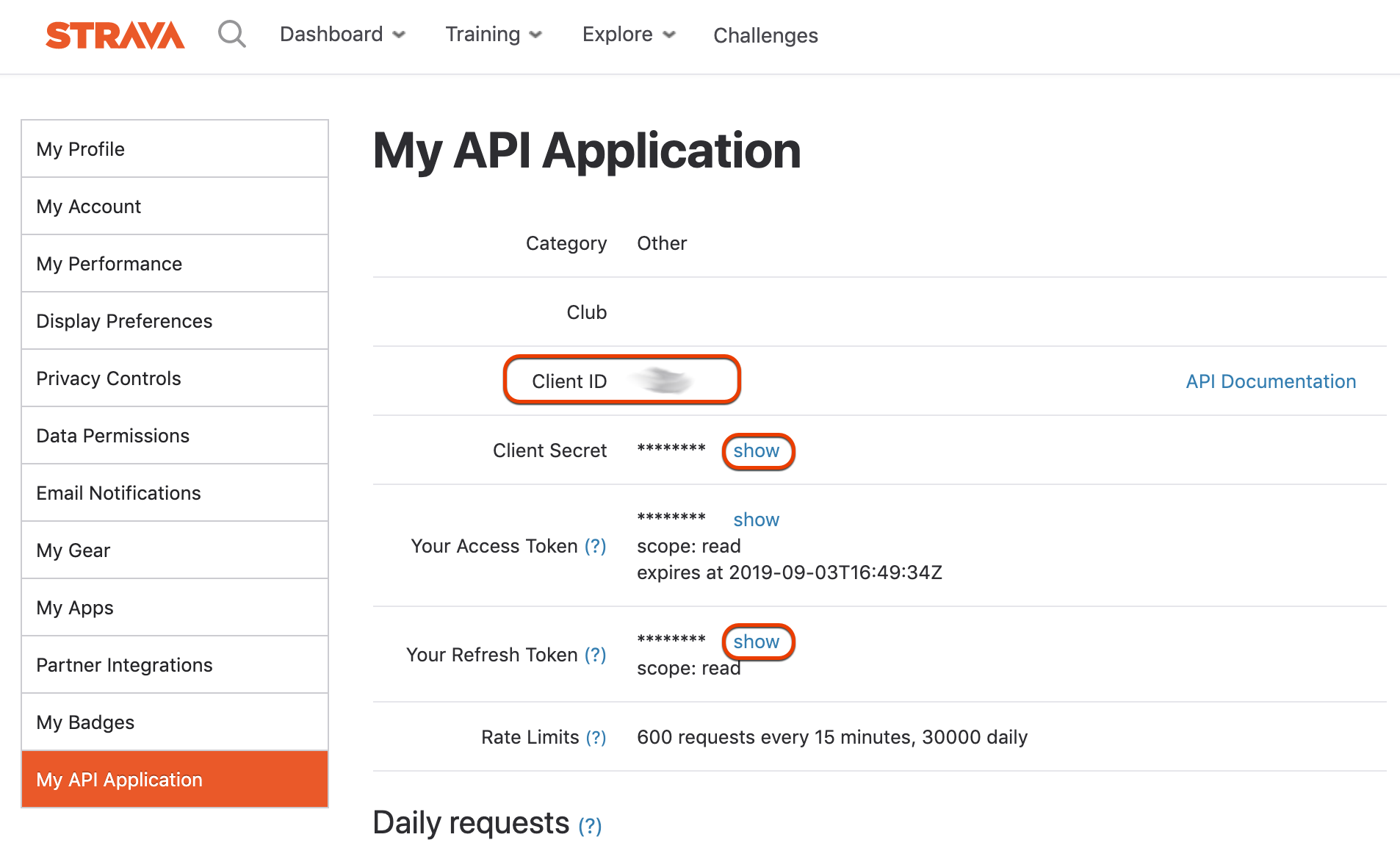
| Strava API field | Settings Key |
|---|---|
| Client ID | strava.api.clientId |
| Client Secret | strava.api.clientSecret |
| Initial Refresh Token | strava.api.refreshToken |
Still on the API settings page, at the very end please add the hostname you're using to turn Jarbunq on the field "Authorization Callback Domain". By default this is "bunq.local". The port is not needed, only the actual host.
Please note that you now have 3 hours to start the service. Also if you stop the Jarbunq for too long (hours or days) after you have started it, you might need to get a new refresh token from the Strava API page.
How open the URL https://bunq.local:8833/strava/auth (or whatever hostname and port you have set). You should see the Strava page confirming the requested access. Once you accept it, you'll be redirected back to Jarbunq and the Strava features will be enabled :-)
Need help? Open an issue
- Source code docs: https://jarbunq.devv.com
- bunq API docs: https://doc.bunq.com/