

Visual navigation through mark rings in Emacs.
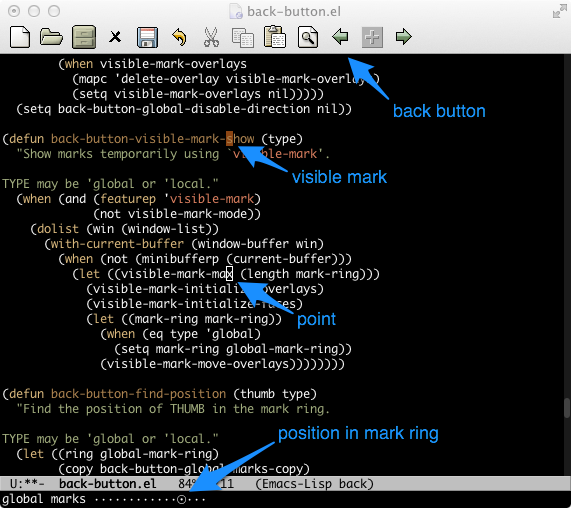
Two-way movement within the ring is supported.
(require 'back-button)

(back-button-mode 1)

;; press the plus sign in the toolbar to create a mark

;; press the arrows in the toolbar to navigate marks

;; or use C-x C-Space as usual, then try C-x C-<right>
;; to reverse the operationBack-button provides an alternative method for navigation by analogy with the "back" button in a web browser.
Every Emacs command which pushes the mark leaves behind an invisible record of the location of the point at that moment. Back-button moves the point back and forth over all the positions where some command pushed the mark.
This is essentially a replacement for pop-global-mark, and the
default keybindings (when the minor mode is activated) override
that command. The differences with pop-global-mark are:
-
Visual index showing how far you have traveled in the mark ring.
-
Easy way to move both forward and backward in the ring.
-
Pushes a mark on the first of a series of invocations, so you can always return to where you issued the command.
-
Skips duplicate positions, so that the interactive command always moves the point if possible.
Commands and keybindings are also included to give identical
semantics for navigating the local (per-buffer) mark-ring. This
consistency in navigation comes at the cost of pushing the mark
twice, so experienced Emacs users may prefer to unbind these
commands and/or set back-button-never-push-mark in customize.
When the visible-mark package is installed, marks will be made visible in the current buffer during navigation.
| Keystrokes | Action |
|---|---|
| C-x C-<SPC> | go back in global-mark-ring, respects prefix arg |
| C-x C-<left> | go back in global-mark-ring |
| C-x C-<right> | go forward in global-mark-ring |
| C-x <SPC> | go back in (buffer-local) mark-ring, respects prefix arg |
| C-x <left> | go back in (buffer-local) mark-ring |
| C-x <right> | go forward in (buffer-local) mark-ring |
When the smartrep package is installed, the C-x prefix need
not be used for consecutive back-button commands.
This library depends upon other commands pushing the mark to provide useful waypoints for navigation. This is a common convention, but not universal.
The function back-button-push-mark-local-and-global may be
useful to call from Lisp. It is a replacement for push-mark
which unconditionally pushes onto the global mark ring,
functionality which is not possible using vanilla push-mark.
Theoretically, back-button-push-mark-local-and-global could
cause issues with Lisp code which depends on the convention that
global-mark-ring not contain consecutive marks in the same
buffer. However, no such issues have been observed.
GNU Emacs version 24.4-devel     : yes, at the time of writing
GNU Emacs version 24.3           : yes
GNU Emacs version 23.3           : yes
GNU Emacs version 22.2           : yes, with some limitations
GNU Emacs version 21.x and lower : unknown
For GNU Emacs versions lower than 24.3, the cl-lib package is required.
Uses if present: nav-flash.el, smartrep.el, unicode-fonts.el, visible-mark.el