

Connect multiple Bluetooth earbuds to one PC — hear audio on all of them!



Quick Start • Features • Download • How It Works • FAQ
You have 2 Bluetooth earbuds (or speakers) and want to listen to the same audio on both from your Windows PC.
But Windows only lets you play audio on ONE device at a time!
Max Paire mirrors your PC audio to 2, 3, 4, or more Bluetooth earbuds/speakers at the same time. Zero lag. Clean audio. One click.
🎧 Watch a movie with your friend — both wearing your own earbuds 🎵 Play music on two Bluetooth speakers at a party 🎮 Game together with shared audio on separate earbuds 📺 Share YouTube/Netflix audio without splitting earbuds
- Download → Go to Releases and download
MaxPaire.exe - Pair your earbuds in Windows Bluetooth Settings
- Run
MaxPaire.exe— it auto-detects your earbuds - Click
Start Sync— done! Both earbuds play audio! 🎶
That's it. No installation needed. Just download and run.
📺 Watch the install walkthrough on YouTube
- Download
MaxPaire_Installer.zipfrom Releases - Extract and run
INSTALL.bat - Now you have:
- Desktop shortcut
- Start Menu entry (search "Max Paire")
- System tray icon
- Shows in Add/Remove Programs
| Feature | Description |
|---|---|
| 🎧 Multi-Device | Connect 2, 3, 4+ earbuds or speakers at once |
| ⚡ Zero Lag | PortAudio C-level callbacks — audio runs in native code, not Python |
| 🌙 Dark / Light Theme | Beautiful modern UI with theme toggle |
| 📌 System Tray | Minimizes to tray — always accessible from taskbar |
| 🔄 Auto-Detect | Automatically finds your Bluetooth devices |
| 🔊 Any Brand | Works with ANY Bluetooth earbuds — Sony, JBL, boAt, AirPods, Samsung, etc. |
| 🆓 100% Free | No ads, no premium, no subscription. Free forever. |
| 📦 Portable | Single .exe file. No installation required. |
| 🔒 Safe | Open source. No data collection. No internet needed. |
| File | Description |
|---|---|
MaxPaire.exe |
Just download and run — works instantly |
MaxPaire_Installer.zip |
Includes installer for desktop shortcut + Start Menu |
Requirements: Windows 10 or 11. That's it!
Your PC plays audio
       ↓
Windows sends to DEFAULT earbud (Earbud A) ← plays normally
       ↓
Max Paire captures that audio (WASAPI loopback)
       ↓
Sends it to Earbud B, C, D... ← plays the same audio!
       ↓
ALL earbuds hear the same thing! 🎶
In simple words:
- Earbud A = your normal Windows audio device (plays audio like usual)
- Earbud B, C, D = Max Paire copies the audio and sends it to these
- Result = everyone hears the same thing!
Open Windows Settings → Bluetooth → Pair both earbuds one by one.
Open Windows Settings → Sound → Set one earbud as your output device.
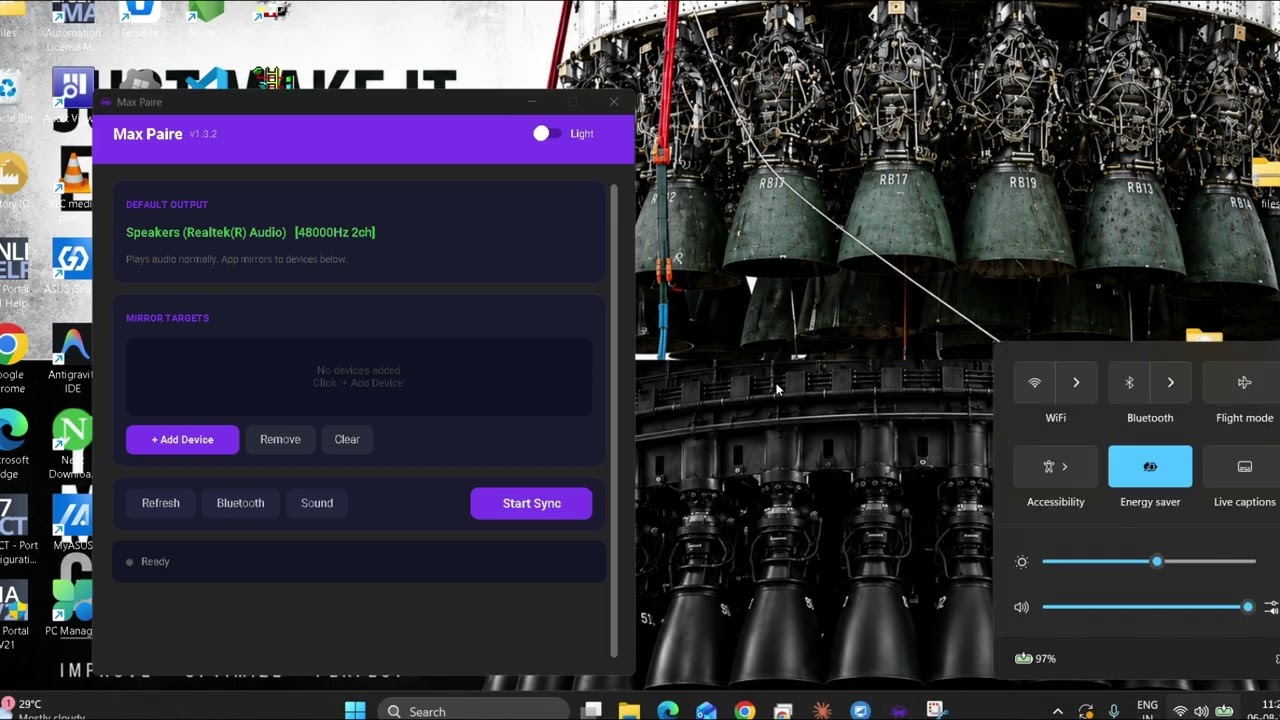
Double-click MaxPaire.exe. It will show:
- Your default earbud at the top (Earbud A)
- Your other earbuds in the list below (auto-detected!)
Press the big purple Start Sync button. Done! 🎉
Both earbuds now play the same audio. Open YouTube, Spotify, a movie — anything. Both hear it.
- To stop: click Stop Sync
- To minimize: click X (goes to system tray)
- To switch theme: use the Dark/Light toggle at the top
Can I connect more than 2 earbuds?
Yes! Click + Add Device to add 3, 4, or more earbuds/speakers. There's no limit.
Will this work with ANY Bluetooth earbuds?
Yes! Max Paire works with any brand — Sony, JBL, boAt, Samsung Galaxy Buds, AirPods (on Windows), Realme, OnePlus, Noise, and any others.
Is there any delay/lag?
Almost zero! Max Paire uses PortAudio C-level callbacks which run in native code (not Python). The delay is about 20-40ms which is unnoticeable.
Does it use the internet?
No! Max Paire is 100% offline. It doesn't connect to the internet, doesn't collect data, doesn't show ads.
Windows SmartScreen shows a warning — is it safe?
Yes, it's completely safe. The warning appears because the exe isn't code-signed (that costs $200/year). Just click "More info" → "Run anyway". The entire source code is open — you can verify it yourself!
My earbuds show as "Hands-Free AG Audio" — should I use that?
No! That's the call/mic profile (8kHz mono = terrible quality). Always pick the "Stereo" or "Headphones" version of your earbuds.
Can I use this with wired headphones too?
Yes! Max Paire works with any audio output device — Bluetooth earbuds, Bluetooth speakers, wired headphones, USB audio devices, etc.
Will this increase my Bluetooth range?
No, Bluetooth range is a hardware limitation (usually 10 meters). But Max Paire uses large audio buffers, so brief signal drops won't cause crackling.
If you want to build the exe yourself:
# 1. Clone this repo
git clone https://github.com/maheshmaximusmax/max-paire.git
cd max-paire

# 2. Install Python (if you don't have it)
# Download from https://python.org

# 3. Run the build script
BUILD.bat
# This installs dependencies and creates MaxPaire.exe in the dist/ folder

# 4. (Optional) Install as a proper Windows app
INSTALL.batpyaudiowpatch— WASAPI audio capturecustomtkinter— Modern UIpystray+Pillow— System tray iconnumpy— Audio resamplingpyinstaller— EXE packaging
Want to make Max Paire better? Feel free to:
- Fork this repo
- Make your changes
- Submit a Pull Request
Ideas for contributions:
- macOS / Linux support
- Auto-reconnect when earbuds disconnect
- Volume control per device
- Audio delay adjustment for lip-sync
MIT License — Free to use, modify, and share. See LICENSE for details.
If Max Paire helped you, please give it a ⭐ star on GitHub! It helps others find this tool.
Made with 💜 by Max