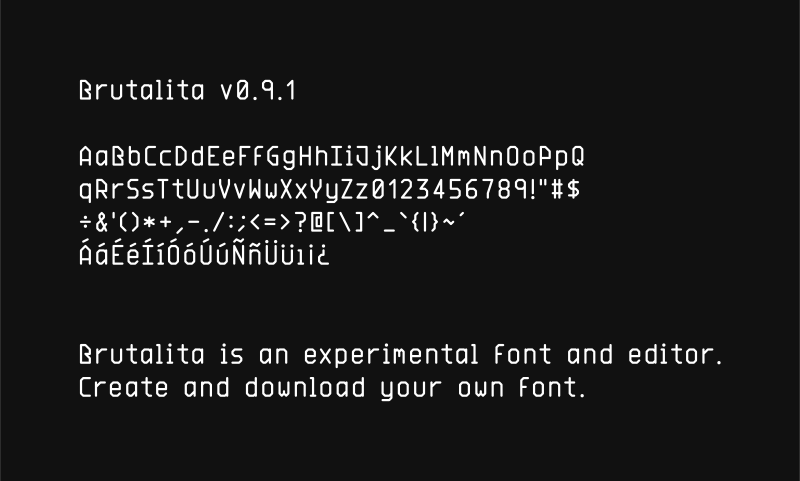
Brutalita is an experimental font and font editor. Draw in your browser, download OTF.
The name means "little brutal" in spanish. Made with SVG and Opentype.JS.
- brutalita.com — the editor
- brutalita.com/demo — specimens at several sizes
Two families, Brutalita (proportional) and Brutalita Mono, each in nine weights, as OTF for desktop and WOFF2 for the web. These links always point at the latest release.
| Weight | Desktop | Web |
|---|---|---|
| Thin | Brutalita-Thin.otf | Brutalita-Thin.woff2 |
| Extra Light | Brutalita-ExtraLight.otf | Brutalita-ExtraLight.woff2 |
| Light | Brutalita-Light.otf | Brutalita-Light.woff2 |
| Regular | Brutalita-Regular.otf | Brutalita-Regular.woff2 |
| Medium | Brutalita-Medium.otf | Brutalita-Medium.woff2 |
| Semi Bold | Brutalita-SemiBold.otf | Brutalita-SemiBold.woff2 |
| Bold | Brutalita-Bold.otf | Brutalita-Bold.woff2 |
| Extra Bold | Brutalita-ExtraBold.otf | Brutalita-ExtraBold.woff2 |
| Black | Brutalita-Black.otf | Brutalita-Black.woff2 |
Mono files are named Brutalita Mono-{Style}, with the space URL-encoded:
Mono Regular OTF,
WOFF2.
@font-face {
  font-family: 'Brutalita';
  src: url('https://brutalita.com/font/Brutalita-Regular.woff2') format('woff2');
  font-weight: 400;
}
Both families cover printable ASCII, the Spanish set — ÁÉÍÑÓÚÜ áéíñóúü ¿ ¡ —
and ↕. Accents sit in their own band above the cap line, so a line of accented
capitals still fits its line box; line-height: normal is 1.24em.
Compile a font source to .otf without opening the editor.
pnpm dlx brutalita build my-font.json -o MyFont.otfThe source is the same JSON the editor exports — { "config": {...}, "marks": {...}, "chars": {...} } — where each glyph is a list of polylines on a 2×4 half-step grid.
With no source argument the CLI looks for ./font.json, then ./src/font.json, then
falls back to the copy of Brutalita it bundles.
A glyph can also be built from another instead of drawn, either by taking an
accent from marks or by turning the letter around:
"marks": { "acute": [[[0.5, 0], [1.5, -0.5]]] },
"chars": {
  "á": { "base": "a", "mark": "acute" },
  "¿": { "base": "?", "rotate": 180 }
}| Command | What it does |
|---|---|
build |
Compile a font source to .otf |
render |
Render text to a single-stroke .svg |
validate |
Check a font source for errors |
info |
Describe a font source, or read a built .otf back |
init |
Create a starter font source |
watch |
Rebuild whenever the source changes |
Run brutalita help <command> for the full option list.
# all nine standard weights, into a directory
brutalita build src/font.json -d public/font -w all

# any weight from 1 to 1000 builds, named after itself when it has no
# standard name (Brutalita-550.otf)
brutalita build src/font.json -w 550 --style-name SemiMedium

# pipe the bytes somewhere else
brutalita build src/font.json -w 700 -o - > Bold.otf

# a specimen image
brutalita render src/font.json -t "Hello\nWorld" --background "#111" --width 800 -o hello.svg

# check a font you are editing by hand
brutalita validate my-font.json --strict
brutalita info my-font.json
Diagnostics always go to stderr, so --out - and --json stay pipeable.
Exit codes: 0 success, 1 usage or I/O error, 2 invalid font source.
pnpm dev         # the editor at localhost:2788
pnpm cli         # run the CLI from source
pnpm assets      # regenerate every committed artifact (fonts + banner)
pnpm test        # unit tests + golden font/SVG regression tests
pnpm typecheck
pnpm build:cli   # bundle the CLI to dist/cli/brutalita.mjs
The built fonts and the banner are committed: the .otf files are the golden
reference for the build tests, and GitHub serves the banner above straight from
the repo. pnpm assets rebuilds them byte-for-byte, so a clean git status
afterwards means they are current.
To release a new version of the typeface, bump config.version in src/font.json
and the --timestamp in fonts:otf, then run pnpm assets.
BSD 3-Clause. © Javier Bórquez.