React Tree Component Library where both folders and files are clickable


Unlike other Tree components, this revolutionary Tree component allows both folders and files to be clickable for interaction.
| Feature | Typical Tree | 🌳 Tree Component |
|---|---|---|
| Folder Click | ❌ Expand/collapse only | ✅ Click event + expand/collapse |
| File Click | ✅ Clickable | ✅ Clickable |
| Search Feature | ❌ Requires separate implementation | ✅ Built-in search + highlight |
| Default Expand State | ❌ Manual setup | ✅ Expand all folders at once |
| TypeScript | ✅ Full type safety |
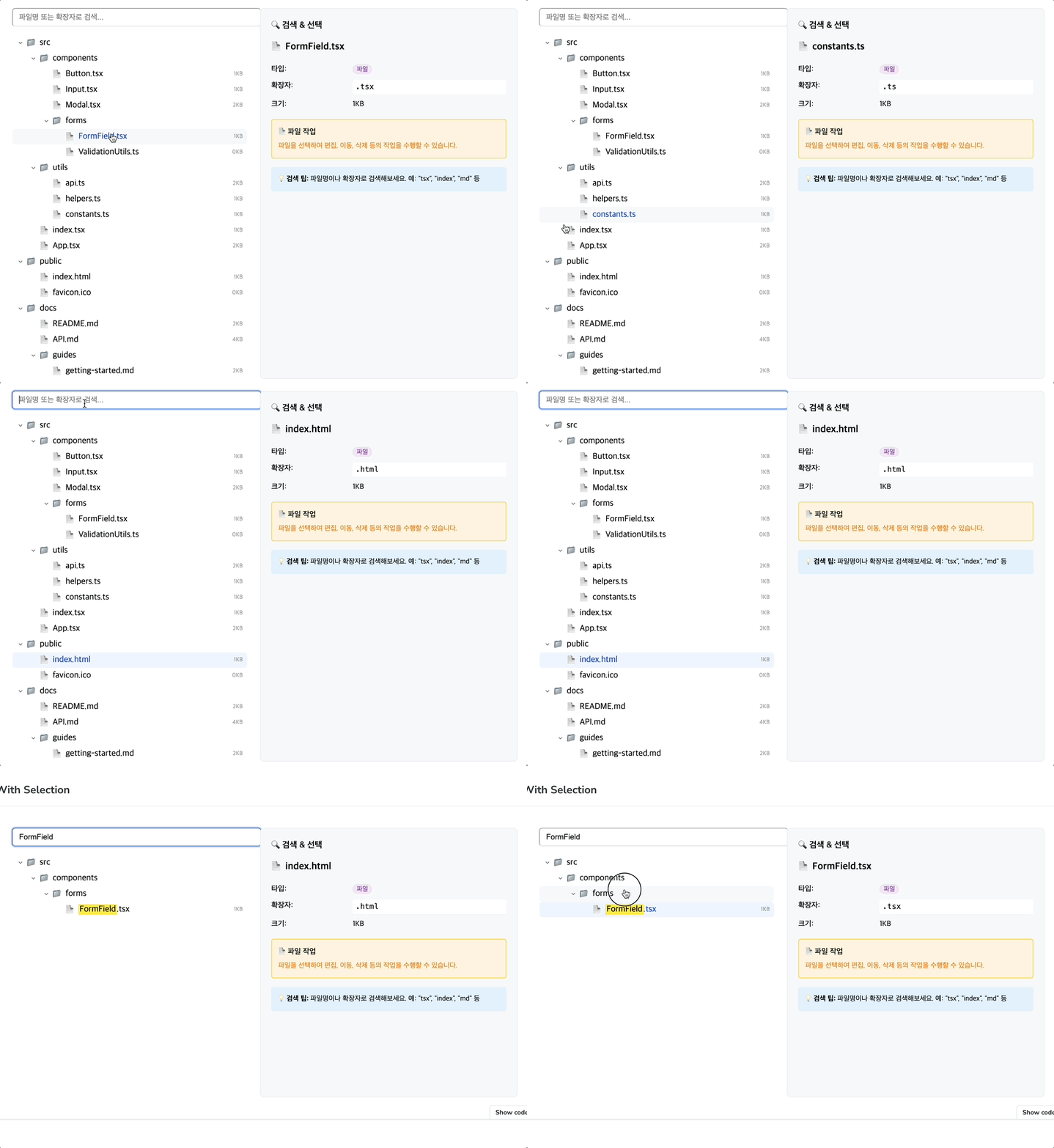
# npm
npm install @happyhyep/tree-component

# yarn
yarn add @happyhyep/tree-component

# pnpm
pnpm add @happyhyep/tree-componentimport React, { useState } from 'react';
import { Tree, TreeItem } from '@happyhyep/tree-component';
interface FileData {
name: string;
type: 'folder' | 'file';
size?: number;
}
const data: TreeItem<FileData>[] = [
{
id: '1',
parentId: null,
canOpen: true,
data: { name: 'Documents', type: 'folder' },
},
{
id: '2',
parentId: '1',
canOpen: false,
data: { name: 'report.pdf', type: 'file', size: 1024 },
},
{
id: '3',
parentId: '1',
canOpen: true,
data: { name: 'Projects', type: 'folder' },
},
];
function MyApp() {
const [selectedId, setSelectedId] = useState<string>();
return (
<Tree
items={data}
selectedId={selectedId}
onItemClick={(item) => {
setSelectedId(item.id);
console.log('Clicked item:', item.data);
// 💡 Both folders and files are clickable!
if (item.data.type === 'folder') {
console.log('Folder clicked:', item.data.name);
} else {
console.log('File clicked:', item.data.name);
}
}}
renderLabel={(data) => (
<div style={{ display: 'flex', alignItems: 'center', gap: '8px' }}>
<span>{data.type === 'folder' ? '📁' : '📄'}</span>
<span>{data.name}</span>
{data.size && <span>({data.size}KB)</span>}
</div>
)}
/>
);
}import { TreeWithSearch } from '@happyhyep/tree-component';
function SearchableTree() {
const [selectedId, setSelectedId] = useState<string>();
return (
<TreeWithSearch
items={data}
selectedId={selectedId}
onItemClick={(item) => setSelectedId(item.id)}
renderLabel={(data, highlight) => (
<div style={{ display: 'flex', alignItems: 'center', gap: '8px' }}>
<span>{data.type === 'folder' ? '📁' : '📄'}</span>
{/* 🔍 Automatic search term highlighting */}
<HighlightText text={data.name} highlight={highlight} />
</div>
)}
searchFn={(data, keyword) => data.name.toLowerCase().includes(keyword.toLowerCase())}
>
{/* 🎯 Built-in search input */}
<TreeWithSearch.Input placeholder="Search files..." />
</TreeWithSearch>
);
}
// Highlight helper component
const HighlightText = ({ text, highlight }) => {
if (!highlight) return <span>{text}</span>;
const parts = text.split(new RegExp(`(${highlight})`, 'gi'));
return (
<span>
{parts.map((part, i) =>
part.toLowerCase() === highlight.toLowerCase() ? <mark key={i}>{part}</mark> : part,
)}
</span>
);
};function ExpandedTree() {
return (
<Tree
items={data}
defaultExpandAll={true} // 🚀 Expand all folders by default
renderLabel={(data) => <span>{data.name}</span>}
/>
);
}import { Tree } from '@happyhyep/tree-component';
function FileExplorer() {
const [selectedFile, setSelectedFile] = useState(null);
const handleItemClick = (item) => {
if (item.data.type === 'file') {
// File click - open file
openFile(item.data);
} else {
// Folder click - select folder (expand/collapse is automatic)
setSelectedFolder(item.data);
}
};
return (
<div style={{ display: 'flex' }}>
<Tree
items={fileSystemData}
onItemClick={handleItemClick}
renderLabel={(data) => <FileIcon type={data.type} name={data.name} />}
/>
{selectedFile && <FilePreview file={selectedFile} />}
</div>
);
}function OrganizationChart() {
return (
<Tree
items={orgData}
defaultExpandAll={true}
onItemClick={(item) => {
// Both departments and employees are clickable
showPersonDetails(item.data);
}}
renderLabel={(data) => (
<div>
<strong>{data.name}</strong>
<span>({data.position})</span>
</div>
)}
/>
);
}interface TreeItem<T = unknown> {
id: string; // Unique identifier
parentId: string | null; // Parent ID (null for root)
data: T; // User data
canOpen?: boolean; // Whether it can be expanded
hasLeaf?: boolean; // Whether it's a leaf node
children?: TreeItem<T>[]; // Child nodes (auto-generated)
}| Props | Type | Required | Default | Description |
|---|---|---|---|---|
items |
TreeItem<T>[] |
✅ | - | Tree data |
renderLabel |
(data: T) => ReactNode |
✅ | - | Label rendering function |
onItemClick |
(item: TreeItem<T>) => void |
❌ | - | Click handler (both folders/files) |
selectedId |
string |
❌ | - | Selected item ID |
defaultExpandAll |
boolean |
❌ | false |
Expand all folders by default |
className |
string |
❌ | "" |
CSS class |
All Tree props + additional:
| Props | Type | Required | Description |
|---|---|---|---|
searchFn |
(data: T, keyword: string) => boolean |
✅ | Search function |
children |
ReactNode |
❌ | Search input, etc. |
const handleClick = (item) => {
  if (item.data.type === 'folder') {
    // Folder click - special logic
    if (item.data.permissions?.canAccess) {
      navigateToFolder(item);
    } else {
      showPermissionError();
    }
  } else {
    // File click - open file
    openFile(item);
  }
};// Multi-condition search
const advancedSearch = (data, keyword) => {
return (
data.name.toLowerCase().includes(keyword.toLowerCase()) ||
data.tags?.some((tag) => tag.includes(keyword)) ||
data.content?.includes(keyword)
);
};
// Extension search
const extensionSearch = (data, keyword) => {
const extension = data.name.split('.').pop();
return extension?.toLowerCase().includes(keyword.toLowerCase());
};// Memoization for large datasets
const MemoizedTree = React.memo(() => (
<Tree
items={largeDataSet}
renderLabel={React.useCallback(
(data) => (
<span>{data.name}</span>
),
[],
)}
/>
));<Tree
className="my-custom-tree"
items={data}
renderLabel={(data) => <span className={`item-${data.type}`}>{data.name}</span>}
/>.my-custom-tree {
border: 1px solid #ddd;
border-radius: 8px;
padding: 16px;
}
.item-folder {
font-weight: bold;
color: #4a90e2;
}
.item-file {
color: #666;
}# Clone repository
git clone https://github.com/happyhyep/tree-component.git
cd tree-component
# Install dependencies
pnpm install
# Run Storybook
pnpm run storybook
# Build
pnpm run build
# Lint
pnpm run lintComponent documentation and examples are available in Storybook:
pnpm run storybook- Fork this repository
- Create a feature branch (
git checkout -b feature/amazing-feature) - Commit your changes (
git commit -m 'Add amazing feature') - Push to the branch (
git push origin feature/amazing-feature) - Open a Pull Request
This project is licensed under the MIT License.
- 🐛 Bug Reports: GitHub Issues
- 💡 Feature Requests: GitHub Discussions
- 📧 Email: jhi2359@naver.com
폴더와 파일 모두 클릭 가능한 React Tree 컴포넌트 라이브러리 입니다.
다른 Tree 컴포넌트와 달리 폴더와 파일 모두 클릭하여 상호작용할 수 있는 Tree 컴포넌트입니다.
| 기능 | 일반적인 Tree | 🌳 Tree Component |
|---|---|---|
| 폴더 클릭 | ❌ 펼치기/접기만 | ✅ 클릭 이벤트 + 펼치기/접기 |
| 파일 클릭 | ✅ 클릭 가능 | ✅ 클릭 가능 |
| 검색 기능 | ❌ 별도 구현 필요 | ✅ 내장 검색 + 하이라이트 |
| 기본 확장 상태 | ❌ 수동 설정 | ✅ 한 번에 모든 폴더 확장 |
| TypeScript | ✅ 완전한 타입 안전성 |
# npm
npm install @happyhyep/tree-component

# yarn
yarn add @happyhyep/tree-component

# pnpm
pnpm add @happyhyep/tree-componentimport React, { useState } from 'react';
import { Tree, TreeItem } from '@happyhyep/tree-component';
interface FileData {
name: string;
type: 'folder' | 'file';
size?: number;
}
const data: TreeItem<FileData>[] = [
{
id: '1',
parentId: null,
canOpen: true,
data: { name: 'Documents', type: 'folder' },
},
{
id: '2',
parentId: '1',
canOpen: false,
data: { name: 'report.pdf', type: 'file', size: 1024 },
},
{
id: '3',
parentId: '1',
canOpen: true,
data: { name: 'Projects', type: 'folder' },
},
];
function MyApp() {
const [selectedId, setSelectedId] = useState<string>();
return (
<Tree
items={data}
selectedId={selectedId}
onItemClick={(item) => {
setSelectedId(item.id);
console.log('클릭된 항목:', item.data);
// 💡 폴더든 파일이든 모두 클릭 가능!
if (item.data.type === 'folder') {
console.log('폴더 클릭:', item.data.name);
} else {
console.log('파일 클릭:', item.data.name);
}
}}
renderLabel={(data) => (
<div style={{ display: 'flex', alignItems: 'center', gap: '8px' }}>
<span>{data.type === 'folder' ? '📁' : '📄'}</span>
<span>{data.name}</span>
{data.size && <span>({data.size}KB)</span>}
</div>
)}
/>
);
}import { TreeWithSearch } from '@happyhyep/tree-component';
function SearchableTree() {
const [selectedId, setSelectedId] = useState<string>();
return (
<TreeWithSearch
items={data}
selectedId={selectedId}
onItemClick={(item) => setSelectedId(item.id)}
renderLabel={(data, highlight) => (
<div style={{ display: 'flex', alignItems: 'center', gap: '8px' }}>
<span>{data.type === 'folder' ? '📁' : '📄'}</span>
{/* 🔍 검색어 자동 하이라이트 */}
<HighlightText text={data.name} highlight={highlight} />
</div>
)}
searchFn={(data, keyword) => data.name.toLowerCase().includes(keyword.toLowerCase())}
>
{/* 🎯 내장 검색 입력창 */}
<TreeWithSearch.Input placeholder="파일명 검색..." />
</TreeWithSearch>
);
}
// 하이라이트 헬퍼 컴포넌트
const HighlightText = ({ text, highlight }) => {
if (!highlight) return <span>{text}</span>;
const parts = text.split(new RegExp(`(${highlight})`, 'gi'));
return (
<span>
{parts.map((part, i) =>
part.toLowerCase() === highlight.toLowerCase() ? <mark key={i}>{part}</mark> : part,
)}
</span>
);
};function ExpandedTree() {
return (
<Tree
items={data}
defaultExpandAll={true} // 🚀 모든 폴더 기본 확장
renderLabel={(data) => <span>{data.name}</span>}
/>
);
}import { Tree } from '@happyhyep/tree-component';
function FileExplorer() {
const [selectedFile, setSelectedFile] = useState(null);
const handleItemClick = (item) => {
if (item.data.type === 'file') {
// 파일 클릭 시 - 파일 열기
openFile(item.data);
} else {
// 폴더 클릭 시 - 폴더 선택 (펼치기/접기는 자동)
setSelectedFolder(item.data);
}
};
return (
<div style={{ display: 'flex' }}>
<Tree
items={fileSystemData}
onItemClick={handleItemClick}
renderLabel={(data) => <FileIcon type={data.type} name={data.name} />}
/>
{selectedFile && <FilePreview file={selectedFile} />}
</div>
);
}function OrganizationChart() {
return (
<Tree
items={orgData}
defaultExpandAll={true}
onItemClick={(item) => {
// 부서든 직원이든 클릭 가능
showPersonDetails(item.data);
}}
renderLabel={(data) => (
<div>
<strong>{data.name}</strong>
<span>({data.position})</span>
</div>
)}
/>
);
}interface TreeItem<T = unknown> {
id: string; // 고유 식별자
parentId: string | null; // 부모 ID (루트는 null)
data: T; // 사용자 데이터
canOpen?: boolean; // 펼칠 수 있는지 여부
hasLeaf?: boolean; // 리프 노드 여부
children?: TreeItem<T>[]; // 자식 노드 (자동 생성)
}| Props | 타입 | 필수 | 기본값 | 설명 |
|---|---|---|---|---|
items |
TreeItem<T>[] |
✅ | - | 트리 데이터 |
renderLabel |
(data: T) => ReactNode |
✅ | - | 라벨 렌더링 |
onItemClick |
(item: TreeItem<T>) => void |
❌ | - | 클릭 핸들러 (폴더/파일 모두) |
selectedId |
string |
❌ | - | 선택된 항목 ID |
defaultExpandAll |
boolean |
❌ | false |
모든 폴더 기본 확장 |
className |
string |
❌ | "" |
CSS 클래스 |
Tree의 모든 props + 추가:
| Props | 타입 | 필수 | 설명 |
|---|---|---|---|
searchFn |
(data: T, keyword: string) => boolean |
✅ | 검색 함수 |
children |
ReactNode |
❌ | 검색 입력창 등 |
const handleClick = (item) => {
  if (item.data.type === 'folder') {
    // 폴더 클릭 - 특별한 로직
    if (item.data.permissions?.canAccess) {
      navigateToFolder(item);
    } else {
      showPermissionError();
    }
  } else {
    // 파일 클릭 - 파일 열기
    openFile(item);
  }
};// 다중 조건 검색
const advancedSearch = (data, keyword) => {
return (
data.name.toLowerCase().includes(keyword.toLowerCase()) ||
data.tags?.some((tag) => tag.includes(keyword)) ||
data.content?.includes(keyword)
);
};
// 확장자 검색
const extensionSearch = (data, keyword) => {
const extension = data.name.split('.').pop();
return extension?.toLowerCase().includes(keyword.toLowerCase());
};// 큰 데이터셋을 위한 메모이제이션
const MemoizedTree = React.memo(() => (
<Tree
items={largeDataSet}
renderLabel={React.useCallback(
(data) => (
<span>{data.name}</span>
),
[],
)}
/>
));<Tree
className="my-custom-tree"
items={data}
renderLabel={(data) => <span className={`item-${data.type}`}>{data.name}</span>}
/>.my-custom-tree {
border: 1px solid #ddd;
border-radius: 8px;
padding: 16px;
}
.item-folder {
font-weight: bold;
color: #4a90e2;
}
.item-file {
color: #666;
}# 저장소 클론
git clone https://github.com/happyhyep/tree-component.git
cd tree-component
# 의존성 설치
pnpm install
# Storybook 실행
pnpm run storybook
# 빌드
pnpm run build
# 린트
pnpm run lint컴포넌트 문서와 예제는 Storybook에서 확인할 수 있습니다:
pnpm run storybook- 이 저장소를 포크하세요
- 기능 브랜치를 만드세요 (
git checkout -b feature/amazing-feature) - 변경사항을 커밋하세요 (
git commit -m 'Add amazing feature') - 브랜치에 푸시하세요 (
git push origin feature/amazing-feature) - Pull Request를 열어주세요
이 프로젝트는 MIT 라이센스 하에 배포됩니다.
- 🐛 버그 리포트: GitHub Issues
- 💡 기능 요청: GitHub Discussions
- 📧 이메일: jhi2359@naver.com