State-of-the-art tabular ML inside Claude — upload a CSV, ask a question, get predictions, explanations, and a report. Free and self-hostable.
TabICL (Inria, ICML 2025/2026) is a tabular foundation model: it classifies and regresses on tabular data without any hyperparameter tuning, via in-context learning. This MCP server makes it usable from natural language in any MCP-compatible assistant or agent.
You:    Here's my customer spreadsheet — who is likely to churn, and why?
Claude: [load_data]  → 2,340 rows, 12 columns, target "churned" looks binary
        [evaluate]   → 89% accuracy, 0.93 ROC-AUC on held-out data
        [explain]    → top drivers: contract_type, tenure, monthly_charges
        [create_report] → here's a shareable HTML report with the details…
| Tool | What it does |
|---|---|
load_data |
Ingest a CSV — pasted text, a URL (Google Sheets share link, raw GitHub, any CSV URL), or a local file path. Returns a dataset_id so data is transferred once, not per call |
evaluate |
"How well can you predict X?" from a single labeled CSV — honest held-out metrics (accuracy, balanced accuracy, F1, ROC-AUC, confusion matrix / R², RMSE, MAE) |
predict |
Fit on labeled data, predict new rows — labels + per-row confidence (classification) or numbers (regression) |
explain |
Which columns drive the predictions (permutation feature importance) |
create_report |
Self-contained HTML report: metric cards in plain language, confusion matrix, feature importance chart, distributions. Served as a link (remote) or file (local) |
export_predictions |
Page through large prediction results as CSV |
There are three ways to get a CSV to the server. Pick by file size:
| Your data | Best way to share it |
|---|---|
| Up to ~2,000 rows (≈1 MB) | Upload the file straight into the chat and ask your question — simplest, works out of the box |
| ~2,000–50,000 rows | Homepage upload or a Google Sheets link (see below) — the data goes directly to the server instead of through the AI model, which is faster and cheaper |
| More than 50,000 rows / 50 MB | Sample it down — ask your assistant "randomly sample 20,000 rows from this file and give me a smaller CSV", then share that (beyond a few tens of thousands of rows, extra data barely improves accuracy but slows everything down). Power users: run the server locally instead — files load straight from your disk, and you can raise the caps with TABICL_MCP_MAX_ROWS / TABICL_MCP_MAX_MB env vars if your hardware can take it |
Default server limits: 10,000 rows for data passed through the chat, 50,000 rows / 50 MB via link or homepage upload. TabICL works best with 2–100 feature columns.
Homepage upload, explained: the homepage
(gblayer-tabicl-mcp.hf.space for the public
server) is a plain web page with a file picker. Upload a CSV there → the server parses
it, holds it in memory for ~4 hours, and shows you an id like ds_1a2b3c4d. In any
Claude chat you then say "analyze my dataset ds_1a2b3c4d — predict churn" — Claude
passes the id to the tools, and since the data is already sitting on the server,
nothing heavy ever moves through the model. It's the same trick that makes dataset ids
efficient between tool calls, just with a browser doing the initial delivery.
Google Sheets, explained: no setup or integration needed — the server understands Google Sheets share links. In your sheet, click Share → General access → "Anyone with the link" (Viewer) and copy the link. Paste that link into the chat together with your question, and the server converts it to a CSV export automatically. Only do this for sheets that aren't confidential — "anyone with the link" means exactly that.
Connect the public server to claude.ai (Pro/Max/Team plans):
- Go to Settings → Connectors → Add custom connector
- Name:
tabicl· URL:https://gblayer-tabicl-mcp.hf.space/mcp - Leave the OAuth fields empty and click Add — that's it.
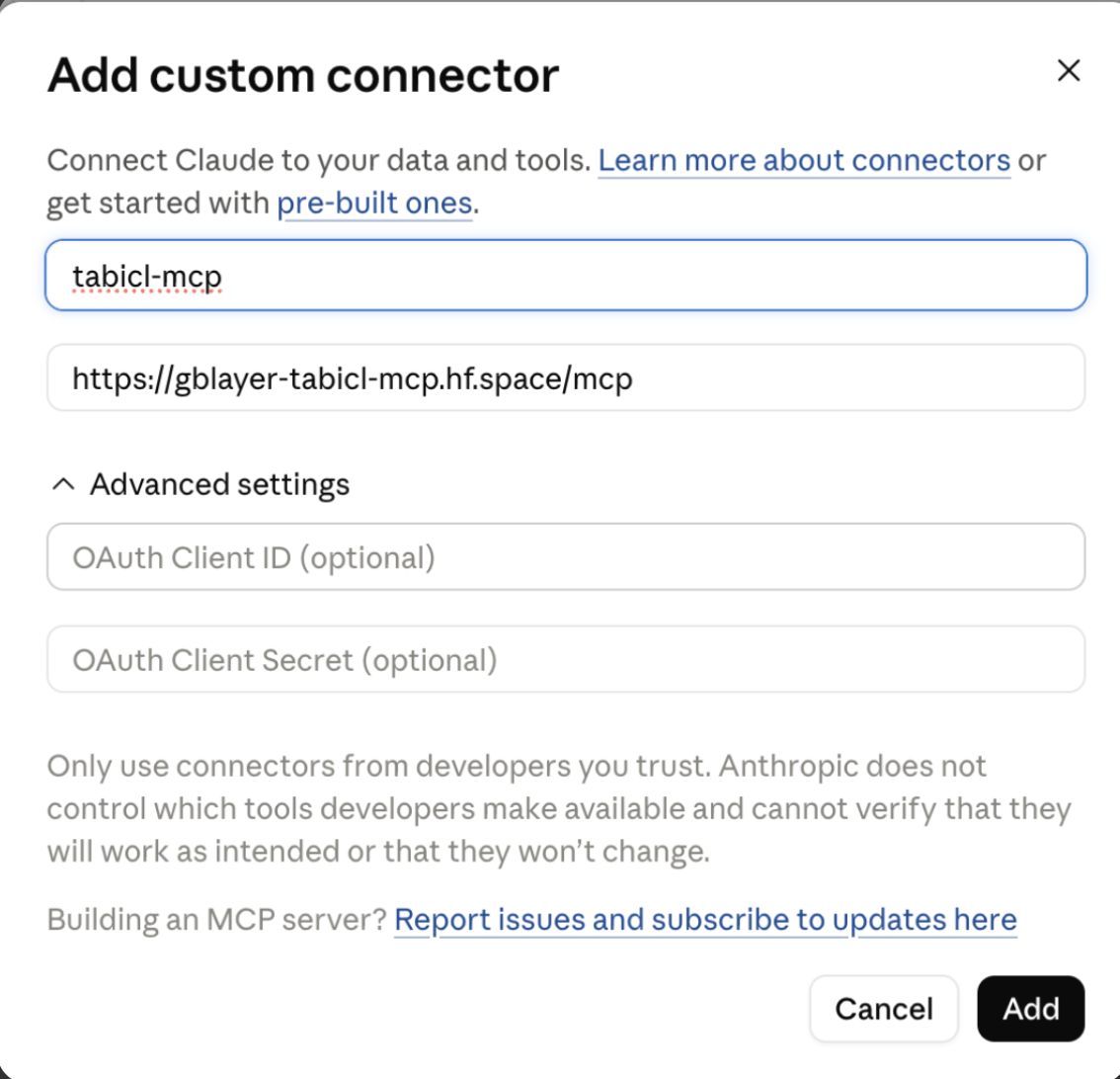
Then paste this into a new chat:
Load this CSV and tell me: can you predict the
churnedcolumn? How accurate is it, what drives churn the most, and can you make me a report? https://raw.githubusercontent.com/gblayer/tabicl-mcp/main/examples/customer_churn.csv
You'll get honest held-out metrics, the churn drivers ranked, and a shareable report — see a sample of what the report looks like (source).
Requires Python ≥ 3.10. With uv: nothing to install, clients run uvx tabicl-mcp.
Claude Desktop — ~/Library/Application Support/Claude/claude_desktop_config.json (macOS) or %APPDATA%\Claude\claude_desktop_config.json (Windows):
{
  "mcpServers": {
    "tabicl": { "command": "uvx", "args": ["tabicl-mcp"] }
  }
}
Claude Code: claude mcp add tabicl -- uvx tabicl-mcp
Cursor / VS Code (.vscode/mcp.json or Cursor Settings → MCP):
{
  "servers": {
    "tabicl": { "type": "stdio", "command": "uvx", "args": ["tabicl-mcp"] }
  }
}
(Or pip install tabicl-mcp and use "command": "tabicl-mcp".)
With a local server, load_data accepts file paths — no pasting needed, and no data ever leaves your machine.
Who this is for: when you use the public URL above, your CSV data is processed on a server operated by this project. That's fine for demos and non-sensitive data — but if you're working with confidential data (customer lists, medical records, company financials), deploy your own copy instead: identical functionality, but your data only ever touches infrastructure you control. A second reason: the public Space is a single shared free instance — if it's busy or asleep you wait, while your own deployment serves only you.
Deploying your own free endpoint on HuggingFace Spaces:
-
Create a Space → Docker SDK → CPU basic (free).
-
HF Spaces reads its deployment settings from a YAML header at the very top of the Space's
README.md— add this before pushing (only needed for the copy that lives on HuggingFace, not for using the server):--- title: TabICL MCP emoji: 🤖 colorFrom: blue colorTo: green sdk: docker app_port: 7860 pinned: false ---
-
Push this repo to the Space (the
Dockerfilepre-downloads model checkpoints at build). -
Your MCP endpoint:
https://YOUR-SPACE.hf.space/mcp
Then connect:
- claude.ai — Settings → Connectors → Add custom connector → paste the URL.
- Any other MCP-compatible client that accepts a Streamable HTTP URL.
Large files: instead of uploading a big CSV into the chat, open the server's homepage (
https://YOUR-SPACE.hf.space/), upload it there, and paste the returned dataset id into the chat — the data then never has to pass through the model.
Why not ChatGPT? ChatGPT's custom-connector support currently can't reliably pass uploaded files (or sometimes even tool calls) to MCP servers, so we don't document it. The server is standard MCP — if ChatGPT's support matures, it will just work.
Free Spaces sleep after inactivity — the first request after idle takes a minute or two while the Space wakes. Everything after that is fast.
docker build -t tabicl-mcp .
docker run -p 7860:7860 tabicl-mcp
# MCP endpoint: http://localhost:7860/mcp · healthcheck: /healthpython -m venv .venv && .venv/bin/pip install -e ".[dev]"
.venv/bin/pytest -m "not slow" # fast tests
.venv/bin/pytest # includes real-model tests (downloads checkpoints)Layout: tabicl_mcp/server.py (MCP tools) · data.py (ingestion + cache) · ml.py (evaluate/predict/importance) · report.py (HTML reports).
MIT licensed. TabICL itself is by soda-inria (BSD-3). PRs welcome.