


A now-playing mini media player docked in the Home Assistant sidebar, on every page. It finds whatever is playing, Music Assistant included, with no configuration, and gives you play/pause, skip and volume without opening a dashboard.
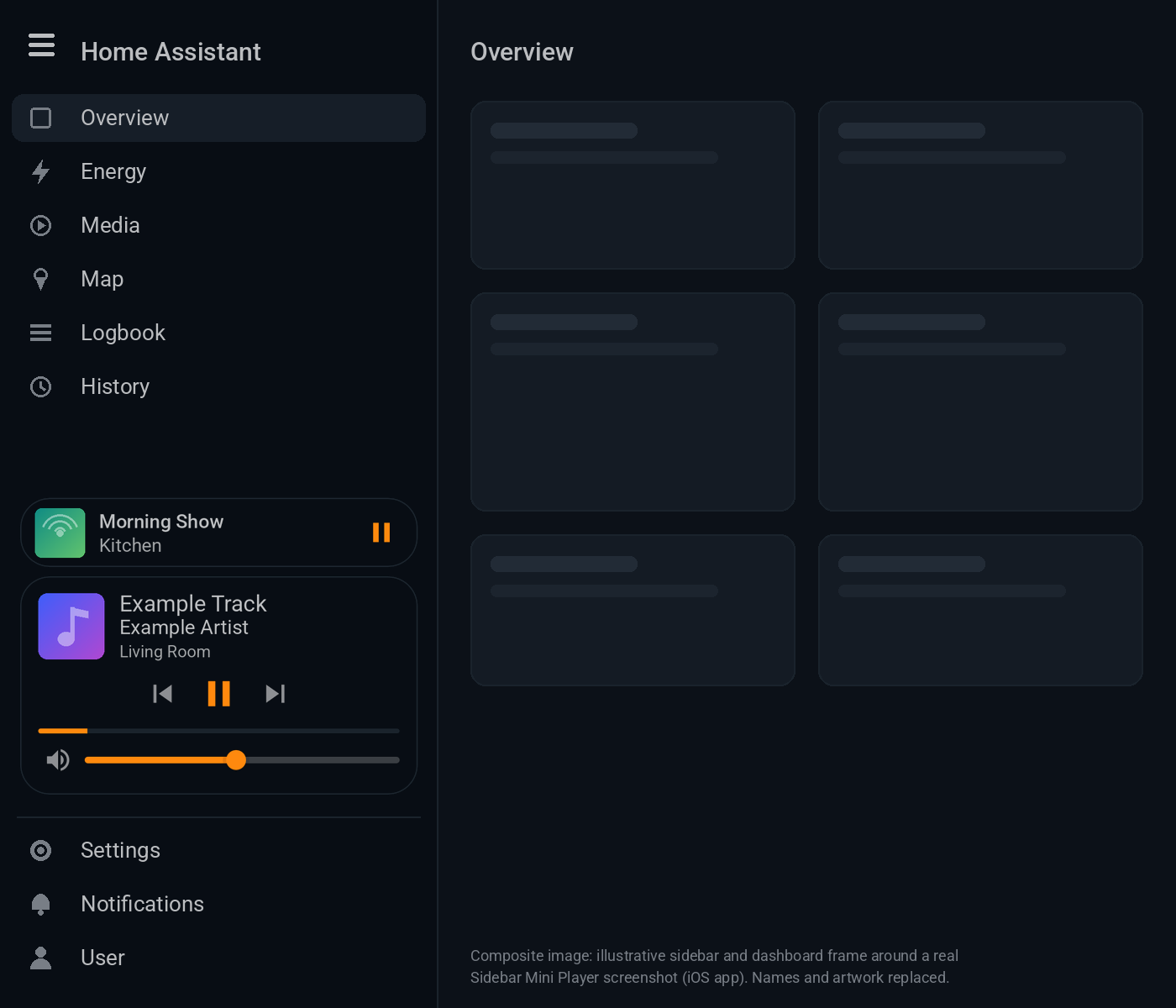
Composite image: an illustrative sidebar and dashboard frame around a real screenshot of the player. Names and artwork are placeholders.
- Features
- Supported media players
- Install with HACS
- Manual install
- Configuration
- Gestures and controls
- Mobile and the iOS companion app
- Theming
- Troubleshooting and FAQ
- Compatibility
- Roadmap
- Contributing
- Credits and licence
- Now playing in the sidebar, on every page. The player sits at the bottom of Home Assistant's main sidebar, just above Settings. It's there on dashboards, in Settings, History, the map and everywhere else. It isn't a dashboard card.
- Zero configuration. Any
media_playerentity that is playing or paused appears automatically. Nothing plays, nothing shows. - Music Assistant aware. When Music Assistant mirrors a speaker you already have, the duplicate native player is hidden, so each room shows once.
- Full mini controls. Artwork, title, artist and speaker, previous / play-pause / next, a progress bar, a volume slider and mute. Volume only shows when the player supports it.
- Instant play/pause. The button flips the moment you tap it, even when a speaker (AirPlay, for example) takes a few seconds to answer.
- Several players at once. The most recent player gets the full card. Every other active player gets a slim card above it: tap to focus, hover to preview, and "+N more" when there are lots.
- Tidies itself up. Paused players drop out after 5 minutes, which you can change.
- Swipe to dismiss. Swipe a card to the right, on a phone, tablet or with the mouse, to hide it until that player changes state. There's also a small × on hover.
- Collapsed sidebar support. With the icons-only sidebar you get the artwork with a play/pause overlay, plus a badge with the number of active players.
- Opens more-info. Tap the artwork or title to open Home Assistant's own media dialog, with sources, grouping and so on.
- Theme friendly. Uses your theme's colours, light or dark, with optional CSS variables for the accent colour, card background and corners.
- Lightweight. One small vanilla JavaScript file with no dependencies, no build step, no entities and no backend.
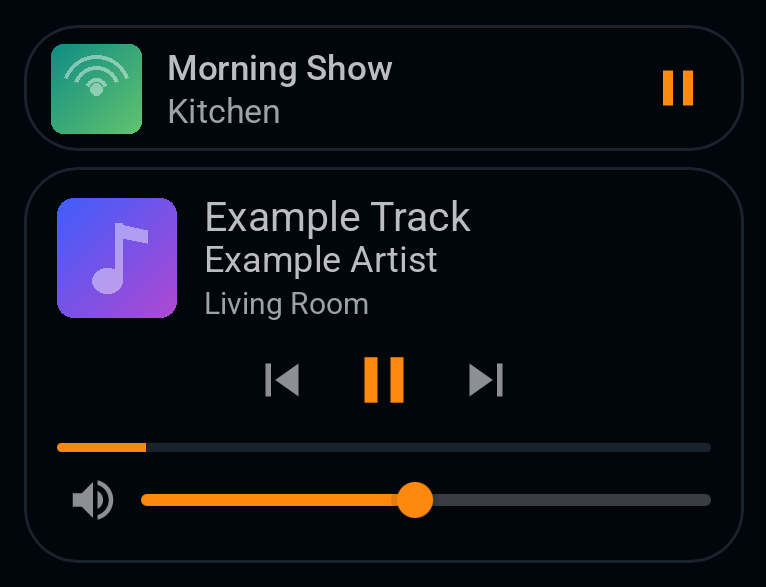
Real screenshot (iOS companion app). Track names, room names and artwork have been replaced with placeholders.
The player works with any integration that creates a standard Home Assistant media_player entity. It uses the usual state and attributes: playing/paused, media_title, media_artist, entity_picture, volume_level and supported_features.
| Integration | Status |
|---|---|
| Music Assistant | Tested daily. Duplicate native players are hidden. |
| Apple TV | Tested. Video apps without track info (for example Netflix) show the app name and a TV icon. |
| AirPlay speakers (through Music Assistant or an integration) | Tested through Music Assistant. |
| Sonos | Expected to work (standard media_player). Not yet confirmed: reports welcome. |
| Spotify (Spotify integration / Spotify Connect) | Expected to work. Not yet confirmed. |
| Google Cast / Chromecast | Expected to work. Not yet confirmed. |
| Kodi | Expected to work. Not yet confirmed. |
| Plex, Jellyfin, Emby, LG webOS, Samsung, Roku, Squeezebox, DLNA, Denon/Marantz… | Any media_player entity should work. Please open an issue if one doesn't. |
Players with no Home Assistant entity can't be shown. One example is the Music Assistant web player running in a browser tab.

- Click the button above. Or open HACS → ⋮ → Custom repositories, add
https://github.com/Evski/ha-sidebar-mini-playerwith type Dashboard, then search for Sidebar Mini Player. - Click Download.
- Choose how to load it.
Add this to configuration.yaml:
frontend:
  extra_module_url:
    - /hacsfiles/ha-sidebar-mini-player/ha-sidebar-mini-player.js?v=1.0.0
Restart Home Assistant, then refresh your browser. In the companion app, reset the frontend cache: see Mobile.
With this route the player loads on every page, including Settings, even if you never open a dashboard. After each update, bump ?v= to the new version so browsers and the app don't keep the old copy.
HACS normally registers downloaded dashboard plugins as a dashboard resource (/hacsfiles/ha-sidebar-mini-player/ha-sidebar-mini-player.js?hacstag=…). That works with no YAML. The catch is that Home Assistant only loads dashboard resources once a dashboard has been opened, so if a tab starts on a non-dashboard page (Settings, History…) the player appears after you first visit a dashboard. If you don't see the resource, add it yourself under Settings → Dashboards → ⋮ → Resources → Add resource, with type JavaScript module.
You can use both routes at once. The module notices it's already loaded and the second copy does nothing.
-
Download
ha-sidebar-mini-player.jsfrom the latest release. -
Copy it to
/config/www/ha-sidebar-mini-player.js, which Home Assistant serves as/local/…. -
Add it to
configuration.yaml:frontend: extra_module_url: - /local/ha-sidebar-mini-player.js?v=1.0.0
Or add
/local/ha-sidebar-mini-player.js?v=1.0.0as a dashboard resource (JavaScript module). -
Restart Home Assistant and refresh the browser.
Uninstall: remove the line or resource, restart, refresh, and delete the file. The player creates no entities, helpers or storage in Home Assistant.
Everything is optional. With no configuration the player shows every playing or paused media_player.
To change settings, define window.sidebarMiniPlayerConfig in a small JavaScript file and load it next to the player. A ready-to-edit copy is in examples/sidebar-mini-player-config.js.
// /config/www/sidebar-mini-player-config.js
window.sidebarMiniPlayerConfig = {
  exclude: ["media_player.browser_mod_*"],
  paused_timeout_minutes: 10,
  accent_color: "#ff9800",
};frontend:
extra_module_url:
- /hacsfiles/ha-sidebar-mini-player/ha-sidebar-mini-player.js?v=1.0.0
- /local/sidebar-mini-player-config.js?v=1The player re-reads the object every second, so load order doesn't matter. You can also try options live from the browser console, for example window.sidebarMiniPlayerConfig = { position: "top" }. To see the settings in effect, run window.sidebarMiniPlayer.config. Invalid values fall back to the default with a console warning.
| Option | Type | Default | Description |
|---|---|---|---|
include |
list of strings | [] |
Only show these players. Entity ids with * wildcards, e.g. media_player.living_*. An empty list means all media_player entities. |
exclude |
list of strings | [] |
Never show these players. Applied after include. Handy for media_player.browser_mod_*. |
paused_timeout_minutes |
number | 5 |
Hide a player that has been paused this long. 0 means never hide. |
position |
"bottom" / "top" |
"bottom" |
bottom sits just above Settings. top sits just below the sidebar header. |
accent_color |
CSS colour | "" |
Colour for buttons, progress and the slider. Empty means the theme's primary colour. |
max_collapsed_cards |
number | 4 |
Collapsed cards shown above the focused card before a "+N more" row. |
max_collapsed_cards_short_window |
number | 2 |
The same cap for windows under 560 px tall. |
dedupe_music_assistant |
boolean | true |
Hide a native player that mirrors an active Music Assistant player (same title or same name). |
swipe_to_dismiss |
boolean | true |
Swipe a card right to dismiss it. |
show_dismiss_button |
boolean | true |
Small × on the focused card when hovering with a mouse. |
show_volume |
boolean | true |
Volume slider and mute, when the player supports them. |
show_progress |
boolean | true |
Progress bar, when the player reports a position. |
remember_dismissed |
boolean | true |
Remember dismissals across reloads, in this browser's local storage. false keeps them until the next reload. |
| Action | Result |
|---|---|
| Tap play/pause, previous or next | Controls that player. Play/pause updates instantly. |
| Tap artwork or title (focused card) | Opens Home Assistant's more-info dialog for the player. |
| Tap a collapsed card | Makes it the focused card. It stays focused while it's active. |
| Hover a collapsed card (mouse) | Previews it expanded. |
| Swipe a card right | Dismisses that player until its state changes, for example when it plays again. |
| Hover × (mouse) | Same as swiping. |
| Drag the volume slider | Sets the volume. The slider never starts a swipe. |
| "+N more" / "Show less" | Shows or hides the extra collapsed cards. |
Swiping is turned off in the collapsed (icons-only) sidebar, where the card is too small to swipe safely.
- The player appears in the sidebar drawer of the iOS companion app (tested), the Android companion app and mobile browsers.
- After installing or updating, reset the app's frontend cache. In the iOS app go to Settings → Companion App → Debugging → Reset frontend cache, then reopen the sidebar. In browsers, do a hard refresh.
- Swipe from the middle of the card, not from the very edge of the screen, which iOS keeps for its own back gesture. The card follows your finger and fades out.
- Vertical swipes still scroll the sidebar as normal.
- Dismissals are stored per device. Dismissing on your phone doesn't hide the player on your laptop.
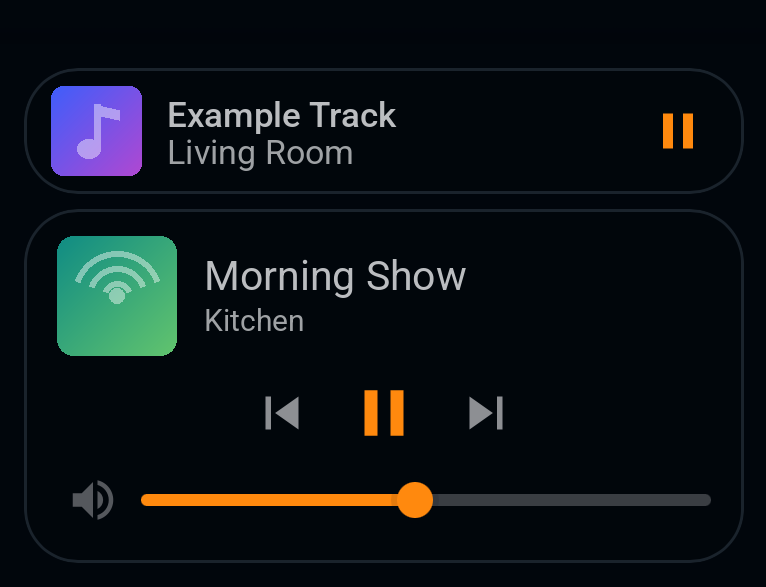
Real screenshot (iOS companion app). Track names, room names and artwork have been replaced with placeholders.
The player follows your Home Assistant theme automatically. It uses --primary-color, --sidebar-background-color, --sidebar-text-color, --sidebar-icon-color, --secondary-background-color, --divider-color, --primary-text-color, --secondary-text-color and --ha-card-border-radius.
You can fine-tune it from your theme with these optional variables:
| Variable | Default | Used for |
|---|---|---|
--sidebar-mini-player-accent-color |
--primary-color |
Play/pause, progress bar, slider, focus ring, badge |
--sidebar-mini-player-card-background |
--secondary-background-color |
Card background |
--sidebar-mini-player-border-radius |
--ha-card-border-radius (12px) |
Card corners |
# themes/my_theme.yaml
My Theme:
  sidebar-mini-player-accent-color: "#ff9800"
  sidebar-mini-player-card-background: "rgba(255, 255, 255, 0.06)"
  sidebar-mini-player-border-radius: 16px
The accent_color config option, if set, takes priority over the theme variable.
The player doesn't appear.
- Is something actually playing or paused? Idle, on, standby and off players are hidden on purpose.
- Open the browser console. You should see
SIDEBAR-MINI-PLAYER v1.0.0, andwindow.__sidebarMiniPlayerLoadedshould return the version. - After adding
extra_module_url, restart Home Assistant, then hard-refresh or reset the app's frontend cache. - Using the dashboard-resource route? Open any dashboard once in that tab.
- Check
include/excludeandpaused_timeout_minutesin your config.
I updated but still see the old version. Bump ?v= in extra_module_url, restart, and clear the cache as above.
A player is missing. It may have been paused for longer than paused_timeout_minutes, or dismissed on this device. It comes back as soon as it plays again. You can also clear the sidebar-mini-player:dismissed key in the browser's local storage.
A paused player came back after a Home Assistant restart. A restart resets each entity's last_changed, so the paused timer starts again from the restart.
I see the same room twice. If neither entity comes from Music Assistant, the dedupe doesn't apply. Hide one with exclude.
I see lots of browser_mod players. Add exclude: ["media_player.browser_mod_*"].
No artwork. The player uses Home Assistant's proxied artwork (entity_picture_local) where available. Plain-http artwork URLs are skipped when Home Assistant is served over https, because browsers would block them as mixed content.
Does it work with Custom Sidebar, card-mod or other sidebar tweaks? Generally yes. It inserts itself into the standard sidebar and re-inserts if the sidebar is re-rendered. If a sidebar mod moves or replaces the bottom items, the player falls back to the end of the panel list.
Does it slow Home Assistant down? No. It does a little work once a second in the browser only, using a cached list of media players even on installs with thousands of entities, and creates nothing on the server.
Can non-admin users see it? Yes. It's a frontend module, so it shows for every user in every browser that loads it.
- Home Assistant 2026.x. Tested on 2026.10.1 (HAOS), in desktop browsers and the iOS companion app.
- Older sidebar layouts (single scrolling list, Settings as a top-level item) are handled and covered by the test suite, but they haven't been tested on real older releases.
- Browsers: current Chrome, Edge, Safari and Firefox, plus the iOS companion app. The Android companion app should work but has not been confirmed yet.
- The sidebar is internal to Home Assistant's frontend and can change between releases. If an update breaks placement, please open an issue with your Home Assistant version.
Ideas under consideration. Please upvote or suggest in Discussions:
- Seek by tapping or dragging the progress bar
- Per-player volume for grouped speakers
- Optional source / sound-mode picker
- Configuration through a small UI panel instead of a JavaScript file
- Translations for the few built-in labels
- Submission to the HACS default store
Contributions are welcome. Bug reports, tested integrations, translations and pull requests all help. See CONTRIBUTING.md.
npm install
npm test # jsdom test suite, about a minuteBuilt by Grok Bot (Homeassistant Expert), conducted by Evan.
Released under the MIT License. Not affiliated with or endorsed by Home Assistant, Nabu Casa or Music Assistant. Icons are from Material Design Icons (Apache 2.0).