Custom plug-ins used for my flipper inspired UI pwnagotchi. Most of it are modified or combined plugins to easily integrate with V0r-t3x LCD Colorized Darkmode Mod and Fancygotchi. The coordinates in dashboard.toml file are designed for Pimoroni Display Hat Mini and will not work properly on other screens without changing the values.

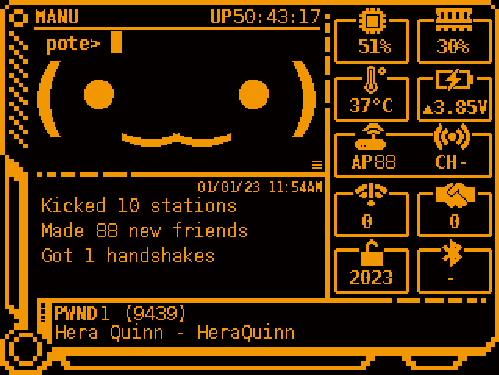
- Display the following: RAM, CPU, Temperature, Battery (pivoyager), Deauth Counter, Total Handshakes, Total Crack Handshakes, Clock and Internet status(in progress).
Requirements:
Pivoyager
"I2C" needs to be enabled (e.g. via raspi-config).
sudo raspi-config
In the menu, select Interfacing Options
- Next select P5 I2C
- Choose yes when asked if you want to enable I2C
- Choose yes when asked if you want to reboot.
Pivoyager binary is also needed.
curl -O https://www.omzlo.com/downloads/pivoyager.tar.gz
tar xvf pivoyager.tar.gz
sudo mv pivoyager /usr/local/bin/
Note: use dashboard2.py if you dont use Pivoyager UPS
Pwnmenu plugin - this is a modified pwnmenu plugin by sn0wflake to work with displayhat mini
copy pwnmenucmd.py to /home/pi/scripts
copy pwnmenu.txt to /home/pi/scripts
enable GPIO Button plug-in with this setting:
main.plugins.gpio_buttons.enabled = true
main.plugins.gpio_buttons.gpios.5 = "python /home/pi/scripts/pwnmenucmd.py up"
main.plugins.gpio_buttons.gpios.6 = "python /home/pi/scripts/pwnmenucmd.py down"
main.plugins.gpio_buttons.gpios.16 = "python /home/pi/scripts/pwnmenucmd.py ok"
main.plugins.gpio_buttons.gpios.24 = "python /home/pi/scripts/pwnmenucmd.py close"
Detailed instructions here: