
A complete solution for controlling Serato DJ Pro stems with the Akai LPD8 MK2, featuring custom MIDI mappings and LED feedback.
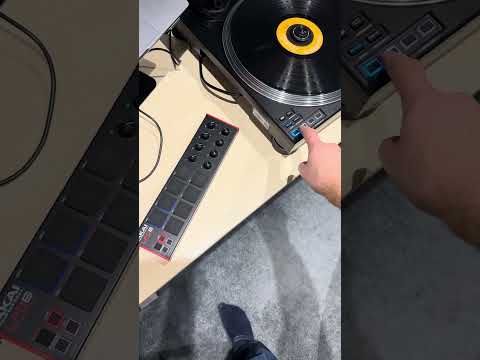
There was a desire to have separate stem control for Serato DJ Pro - dedicated controls for turning stems on/off, stem FX, and stem fade (volume). The built-in stem controls on mixers and turntables are limited, and the LPD8 MK2 with its 8 pads and 8 knobs is perfectly suited for this.
First, I created the Serato MIDI mapping file to wire up the LPD8 controls to Serato's stem functions. Then I wrote a Go program to control the LPD8's RGB LEDs, providing visual feedback that Serato doesn't natively support. This really finished it off.
.
├── serato_lpd8_stems.xml    # Serato MIDI mapping for stem control
└── lpd8-led-bridge/         # LED feedback program (Go)
    ├── main.go
    ├── config.json
    ├── build.sh
    └── releases/
The serato_lpd8_stems.xml file maps the LPD8 controls to Serato's stem functions:
┌─────────────────────────────────────────────────────────┐
│                    LPD8 MK2 Layout                      │
├─────────────────────────────────────────────────────────┤
│                                                         │
│   ○ K1    ○ K2    ○ K3    ○ K4   (Knobs - Stem Volume)  │
│   Vocal   Drums   Bass   Melody                         │
│                                                         │
│   ○ K5    ○ K6    ○ K7    ○ K8   (Knobs - unused)       │
│                                                         │
│  ┌─────┬─────┬─────┬─────┐                              │
│  │  5  │  6  │  7  │  8  │  Pads - Stem On/Off          │
│  │Vocal│Drums│Bass │Meldy│                              │
│  ├─────┼─────┼─────┼─────┤                              │
│  │  1  │  2  │  3  │  4  │  Pads - Stem FX              │
│  │Vocal│Drums│Bass │Meldy│                              │
│  └─────┴─────┴─────┴─────┘                              │
│                                                         │
└─────────────────────────────────────────────────────────┘
| Control | MIDI | Serato Function |
|---|---|---|
| Knob 1 | CC 70 | Vocals volume (codfather_gain slot 0) |
| Knob 2 | CC 71 | Drums volume (codfather_gain slot 1) |
| Knob 3 | CC 72 | Bass volume (codfather_gain slot 2) |
| Knob 4 | CC 73 | Melody volume (codfather_gain slot 3) |
| Pad 5 | Note 40 | Vocals on/off (codfather_st slot 0) |
| Pad 6 | Note 41 | Drums on/off (codfather_st slot 1) |
| Pad 7 | Note 42 | Bass on/off (codfather_st slot 2) |
| Pad 8 | Note 43 | Melody on/off (codfather_st slot 3) |
| Pad 1 | Note 36 | Vocals FX (codfather_fx slot 0) |
| Pad 2 | Note 37 | Drums FX (codfather_fx slot 1) |
| Pad 3 | Note 38 | Bass FX (codfather_fx slot 2) |
| Pad 4 | Note 39 | Melody FX (codfather_fx slot 3) |
- Copy
serato_lpd8_stems.xmlto your Serato MIDI mappings folder - In Serato DJ Pro, go to Setup > MIDI
- Click Import and select the XML file
- Enable the LPD8 MK2 as a MIDI device
For controlling two decks with two LPD8s:
| Deck 1 (LPD8 #1) | Deck 2 (LPD8 #2) | |
|---|---|---|
| Knobs channel | 1 (global) | 1 (global) |
| Pads channel | 10 | 11 |
| deck_id | 0 | 1 |
Important: Knobs must use "global" channel (channel 1). Other configurations don't work reliably with Serato and mixers like the DJM-S11. For Deck 2, use different CC numbers (e.g., CC 74-77) rather than a different channel.
To create a Deck 2 mapping, duplicate serato_lpd8_stems.xml and change:
deck_id="0"→deck_id="1"channel="10"→channel="11"(for pads only)
The LPD8 MK2 has RGB LEDs on each pad, but Serato doesn't send LED feedback to it. The lpd8-led-bridge program fills this gap by tracking button presses locally and controlling the LEDs via SysEx messages.
| Pad Row | Color | Function |
|---|---|---|
| Top (5-8) | Blue | Stem on/off state |
| Bottom (1-4) | Amber | Stem FX state |
- Startup: Top row blue (stems on), bottom row off (no FX)
- Press FX pad: Amber lights up, corresponding blue(s) turn off
- Turn knob: Blue brightness reflects stem volume (off when < 2)
┌─────────────┐     ┌──────────────────┐     ┌─────────────┐
│   LPD8 MK2  │────▶│  LPD8 LED Bridge │────▶│  LPD8 LEDs  │
│  (buttons)  │     │                  │     │  (SysEx)    │
└─────────────┘     │   Local State    │     └─────────────┘
                    │    Tracking      │
┌─────────────┐     │                  │
│ PLX-CRSS12  │────▶│  (optional spy)  │
│  (buttons)  │     └──────────────────┘
└─────────────┘
The bridge tracks button presses locally - it does not intercept MIDI from Serato. This avoids feedback loops and works reliably. The downside: if you change stems from Serato's UI, the LEDs won't update (just restart the bridge to resync).
cd lpd8-led-bridge

# List MIDI ports
./lpd8-led-bridge -list

# Run with your LPD8
./lpd8-led-bridge -out "LPD8 mk2"

# With turntable button mirroring (PLX-CRSS12)
./lpd8-led-bridge -out "LPD8 mk2" -spy "PLX-CRSS12"
See lpd8-led-bridge/README.md for full documentation including:
- Configuration options
- Building from source
- Troubleshooting
Program your LPD8 MK2 with these settings (using Akai's editor software):
| Control | Setting |
|---|---|
| Pads 5-8 | Notes 40, 41, 42, 43 |
| Pads 1-4 | Notes 36, 37, 38, 39 |
| Knobs 1-4 | CC 70, 71, 72, 73 |
| Knobs 5-8 | CC 74, 75, 76, 77 |
| Pad Channel | 10 (or 11 for Deck 2) |
| Knob Channel | 1 (global) |
- Akai LPD8 MK2
- Serato DJ Pro (tested with 4.0.2)
- macOS or Windows (for LED bridge)
- Optional: Pioneer PLX-CRSS12 or similar for stem button sync
This setup was developed with a DJM-S11 mixer and PLX-CRSS12 turntables, but it should work with other Serato-compatible hardware. You may need to tweak the config files to match your specific setup.
MIDI Monitor (macOS) is invaluable for inspecting MIDI messages and figuring out the correct note/CC values for your devices.
Coming soon: Rane Performer support (documentation updates in the next few weeks).
Note on releases: The initial release is for macOS (Apple Silicon/ARM and AMD64). A Windows x64 build will follow shortly - just wanted to get this out there early for sharing.
Useful resource: lpd8mk2sysex was invaluable for figuring out the SysEx commands to control the LPD8 MK2's RGB LEDs.
MIT License
- gomidi/midi - Go MIDI library
- rtmidi - Cross-platform MIDI I/O
- LPD8 MK2 SysEx documentation