
DetrWatch is an object detection and tracking system designed to monitor multiple camera streams in real time. By leveraging deep learning models, it identifies objects (such as people, vehicles, and animals), generates real-time notifications, and maintains a detailed history of detection sessions.
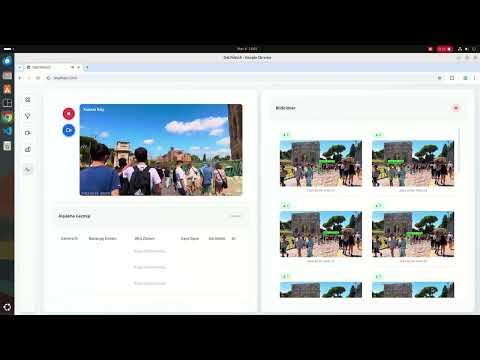
note: an RTSP URL of a camera should be used here instead of the video path
The application consists of the following core components:
The central control layer of the system, developed using Python 3.11 and FastAPI.
- Manages camera configurations, system settings, and detection sessions.
- Uses MongoDB for persistent storage of configuration and historical data.
- Uses Redis for Pub/Sub messaging, state management, and task control.
- Pushes real-time detection events to the frontend via Server-Sent Events (SSE).
A GPU-accelerated processing engine responsible for analyzing video streams.
- Built with PyTorch and uses the DETR (DEtection TRansformer) model for high-accuracy object detection.
- Uses the SORT (Simple Online and Realtime Tracking) algorithm to track objects across video frames and prevent repeated notifications for the same object.
- Processes RTSP camera streams using the following pipeline:
FrameProducer -> Inference -> DetectionProcessor -> NotifyProcessor - Publishes detection events to Redis and records detection sessions in MongoDB.
A responsive, real-time user interface that provides operators with full control and visibility.
- Built with Svelte and styled using Tailwind CSS.
- Communicates with the API to display an interactive dashboard.
- Displays live camera feeds, active detection sessions, and generates near real-time notifications when objects are detected.
- Backend / API: Python 3.11, FastAPI, Uvicorn, SSE
- Machine Learning / AI: PyTorch, Transformers (DETR), OpenCV, PyTorch CUDA
- Algorithm: SORT (Kalman Filter–based object tracking)
- Frontend: Node 21, Svelte, Tailwind CSS, Rollup
- Database / Pipeline: MongoDB, Redis
- DevOps: Docker, Docker Compose
DetrWatch/
├── api/                  # FastAPI backend server
│   ├── routes/           # REST endpoints (cameras, notifications, system)
│   ├── services/         # Business logic (camera service, redis pub/sub)
│   └── ...
├── workers/              # Deep learning inference and processing pipeline
│   ├── core/             # MongoDB/Redis clients, SORT tracking, utilities
│   ├── processors/       # Inference pipeline components
│   └── ...
├── frontend/             # Svelte web application
│   ├── src/              # Svelte components and application logic
│   └── package.json
├── data/                 # Volume mounts for MongoDB, Redis, and application data
└── docker-compose.yml    # Main system configuration file
The easiest way to run the system is by using Docker Compose. For GPU acceleration, Docker and Docker Compose must be installed along with the NVIDIA Container Toolkit.
- Docker and Docker Compose
- NVIDIA GPU with appropriate drivers
- NVIDIA Container Toolkit (to enable
--gpus allin Docker)
- Clone the repository (if you haven't already) and navigate to the project directory:
cd /path/to/DetrWatch- Start the system using Docker Compose:
docker-compose up --build -dThis command will start the following services:
- Redis (
redis): on port6379 - MongoDB (
mongodb): on port27017 - API (
api): on port8000(http://localhost:8000) - Frontend (
frontend): on port3000(http://localhost:3000) - Workers (
workers): runs in the background (requires GPU)
- Web Interface: Open
http://localhost:3000in your browser - API Swagger UI: Detailed API documentation is available at
http://localhost:8000/docs
-
Add a Camera An RTSP stream URL is added via the frontend dashboard. The API saves this information to MongoDB and Redis.
-
Start Detection The user starts a detection session. The API sends a
startcontrol signal to thetask_controlRedis channel. -
Inference The Worker receives the signal, connects to the RTSP stream, and begins processing frames using the DETR model.
-
Tracking Processed frames are passed through the SORT tracking algorithm to maintain object identities.
-
Notification When an object (e.g., a person or vehicle) is detected with high confidence and tracked, the Worker publishes an event to the
event_channelin Redis. -
Real-time Alert The API consumes the event from Redis and broadcasts it to the Frontend via SSE, instantly notifying the user.
-
GPU Requirement The inference worker heavily relies on PyTorch and CUDA. Running it on CPU only will result in significant performance degradation and high latency.
-
Authentication User authentication and authorization are not implemented out of the box. The system is designed to run within a secure internal network.
-
Scaling Limitations The current worker pipeline architecture is robust but relies heavily on one-to-one processing queues. Horizontal scaling of worker nodes would require distributed queue management.