






Biomni is a general-purpose biomedical AI agent designed to autonomously execute a wide range of research tasks across diverse biomedical subfields. By integrating cutting-edge large language model (LLM) reasoning with retrieval-augmented planning and code-based execution, Biomni helps scientists dramatically enhance research productivity and generate testable hypotheses.
Biomni-AD is an Alzheimer's disease-specialized extension of Biomni (Stanford SNAP Lab). The work recognized by the 2026 Alzheimer's Insights AI Prize was carried out by a team at the Icahn School of Medicine at Mount Sinai in collaboration with Stanford University. This repository is maintained by Kaimen, Inc., which received the prize award and continues development of the AD1 agent and associated tooling.
Kaimen, Inc. is an independent company. It is not owned by, affiliated with, or endorsed by the Icahn School of Medicine at Mount Sinai or Stanford University. Institutional names appear here to credit prior work, not to indicate sponsorship.
Biomni-AD adds the AD1 agent - a domain-expert variant of the general A1 agent - along with an AD-focused data lake, curated catalogs for publicly available Alzheimer's and neurodegeneration data resources (NIAGADS, CRISPRbrain, ADRD OpenGenomics), and a plan-then-approve Chainlit UI optimized for neurodegeneration research workflows.
This repository contains catalog definitions and configuration only. It does not distribute datasets. Each referenced resource is governed by its own access terms. Controlled-access resources such as NIAGADS require an approved Data Use Certification held by the user or the user's institution. Authorization granted to one institution does not extend to Kaimen, Inc. or to other users of this software. Users are responsible for obtaining their own access before use.
Biomni-AD inherits upstream Biomni's Apache 2.0 license.
Certain integrated tools, databases, and datasets carry more restrictive terms, including licenses that permit non-commercial use only (see license_info.md).
Upstream Biomni provides a commercial_mode configuration flag that excludes datasets not licensed for commercial use; AD1 inherits this flag from A1.
Any commercial deployment requires a component-level license review.
| Document | Description |
|---|---|
| README.md | This file — quick start, usage, and feature overview |
| ARCHITECTURE.md | System design, agent framework, tool ecosystem, and data lake |
| CONTRIBUTION.md | How to contribute tools, data, software, benchmarks, and know-how |
| DETAILS.md | Technical reference: module roles, code organization, and entry points |
| chainlit.md | Chainlit interactive UI welcome page content |
| biomni_env/README.md | Environment installation instructions |
| docs/configuration.md | Configuration management guide |
| docs/known_conflicts.md | Known package conflicts and workarounds |
| docs/docker_vm_deployment.md | Docker and VM deployment guide |
| docs/mcp_integration.md | Model Context Protocol (MCP) server integration |
| docs/building_documentation.md | Building Sphinx API documentation |
Step 1 — Set up the environment
The Biomni environment includes 200+ scientific Python packages, R packages, and CLI bioinformatics tools. Follow biomni_env/README.md to run the setup script (choose the option that fits your needs).
Step 2 — Activate the environment
conda activate biomni_e1Step 3 — Install the Biomni-AD package
Install from this repository (recommended for Biomni-AD features):
pip install git+https://github.com/kuanlinhuang/Biomni.git@biomni-adOr install the latest stable release from PyPI:
pip install biomni --upgradeStep 4 — Configure your API keys
Choose one of the two methods below:
Click to expand API key setup options
cp .env.example .env
# Then open .env and fill in your API keys
Your .env file should look like:
# Set at least ONE provider profile below (leave unused keys empty)

# Profile A: Anthropic direct
ANTHROPIC_API_KEY=your_anthropic_api_key_here
# Optional custom Anthropic endpoint
# ANTHROPIC_BASE_URL=https://api.anthropic.com

# Profile B: OpenAI direct
OPENAI_API_KEY=your_openai_api_key_here
# Optional custom OpenAI-compatible endpoint
# OPENAI_BASE_URL=https://api.openai.com/v1

# Optional: Azure Anthropic (if using Claude via Azure AI Foundry)
ENDPOINT_URL=https://your-resource.services.ai.azure.com/anthropic/
DEPLOYMENT_NAME=your_claude_deployment_name
AZURE_ANTHROPIC_API_KEY=your_azure_anthropic_api_key

# Optional: Azure OpenAI (if using GPT via Azure OpenAI)
AZURE_OPENAI_API_KEY=your_azure_openai_api_key
OPENAI_ENDPOINT=https://your-resource-name.openai.azure.com/

# Optional: AI Studio Gemini API Key (if using Gemini models)
GEMINI_API_KEY=your_gemini_api_key_here

# Optional: groq API Key (if using groq as model provider)
GROQ_API_KEY=your_groq_api_key_here

# Optional: Set the source of your LLM for example:
#"OpenAI", "AzureOpenAI", "Anthropic", "Ollama", "Gemini", "Bedrock", "Groq", "Custom"
LLM_SOURCE=your_LLM_source_here
# BIOMNI_SOURCE is also accepted for backward compatibility
# BIOMNI_SOURCE=your_LLM_source_here

# Optional: AWS Bedrock Configuration (if using AWS Bedrock models)
AWS_BEARER_TOKEN_BEDROCK=your_bedrock_api_key_here
AWS_REGION=us-east-1

# Optional: Custom model serving configuration
# CUSTOM_MODEL_BASE_URL=http://localhost:8000/v1
# CUSTOM_MODEL_API_KEY=your_custom_api_key_here

# Optional: Biomni data path (defaults to ./data)
# BIOMNI_DATA_PATH=/path/to/your/data

# Optional: Timeout settings (defaults to 600 seconds)
# BIOMNI_TIMEOUT_SECONDS=600

# Optional: Auto-switch to local-first mode when network/API calls fail (default: true)
# BIOMNI_AUTO_NETWORK_LIMITED_MODE=trueAdd to your ~/.bashrc (or ~/.zshrc):
# Required — at least one LLM provider key:
export ANTHROPIC_API_KEY="your_key"   # Claude models
export OPENAI_API_KEY="your_key"      # GPT models (optional)
export GEMINI_API_KEY="your_key"      # Gemini models (optional)
export GROQ_API_KEY="your_key"        # Groq models (optional)

# Optional custom endpoints for direct providers:
export ANTHROPIC_BASE_URL="https://api.anthropic.com"
export OPENAI_BASE_URL="https://api.openai.com/v1"

# Azure OpenAI (optional):
export OPENAI_ENDPOINT="https://your-resource.openai.azure.com/"
export AZURE_OPENAI_API_KEY="your_key"

# Azure Anthropic (optional):
export ENDPOINT_URL="https://your-resource.services.ai.azure.com/anthropic/"
export DEPLOYMENT_NAME="your_claude_deployment_name"
export AZURE_ANTHROPIC_API_KEY="your_key"

# AWS Bedrock (optional):
export AWS_BEARER_TOKEN_BEDROCK="your_key"
export AWS_REGION="us-east-1"Some Python packages are not installed by default in the Biomni environment due to dependency conflicts. If you need these features, you must install the packages manually and may need to uncomment relevant code in the codebase. See the up-to-date list and details in docs/known_conflicts.md.
Biomni provides two primary agents:
- A1 (General Agent): The standard biomedical agent for general-purpose tasks.
- AD1 (Alzheimer's Disease Agent): A specialized version of A1 optimized for Alzheimer's and Dementia research. It features:
- specialized data sourcing protocols
- context-aware instructions for neurodegeneration
- optimized tool selection for AD research
A1 (General):
from biomni.agent import A1

# Initialize general agent
agent = A1(llm='claude-sonnet-4-5')
agent.go("Plan a CRISPR screen to identify genes that regulate T cell exhaustion.")
AD1 (Alzheimer's Specialized):
from biomni.agent.ad1 import AD1

# Initialize AD specialized agent
agent = AD1(llm='claude-sonnet-4-5')
agent.go("Analyze Tau aggregation pathways and suggest potential inhibitors.")You can launch a no-code interactive web interface for either agent.
A1 UI:
from biomni.agent import A1
A1().launch_gradio_demo()
AD1 UI:
from biomni.agent.ad1 import AD1
AD1().launch_ui()
UI Requirements: To use the web interface, install Gradio 5.x:
pip install "gradio>=5.0,<6.0"UI Options:
share=True- Create a public shareable linkserver_name="127.0.0.1"- Localhost only (default: "0.0.0.0")require_verification=True- Require access code (default: "Biomni2025")
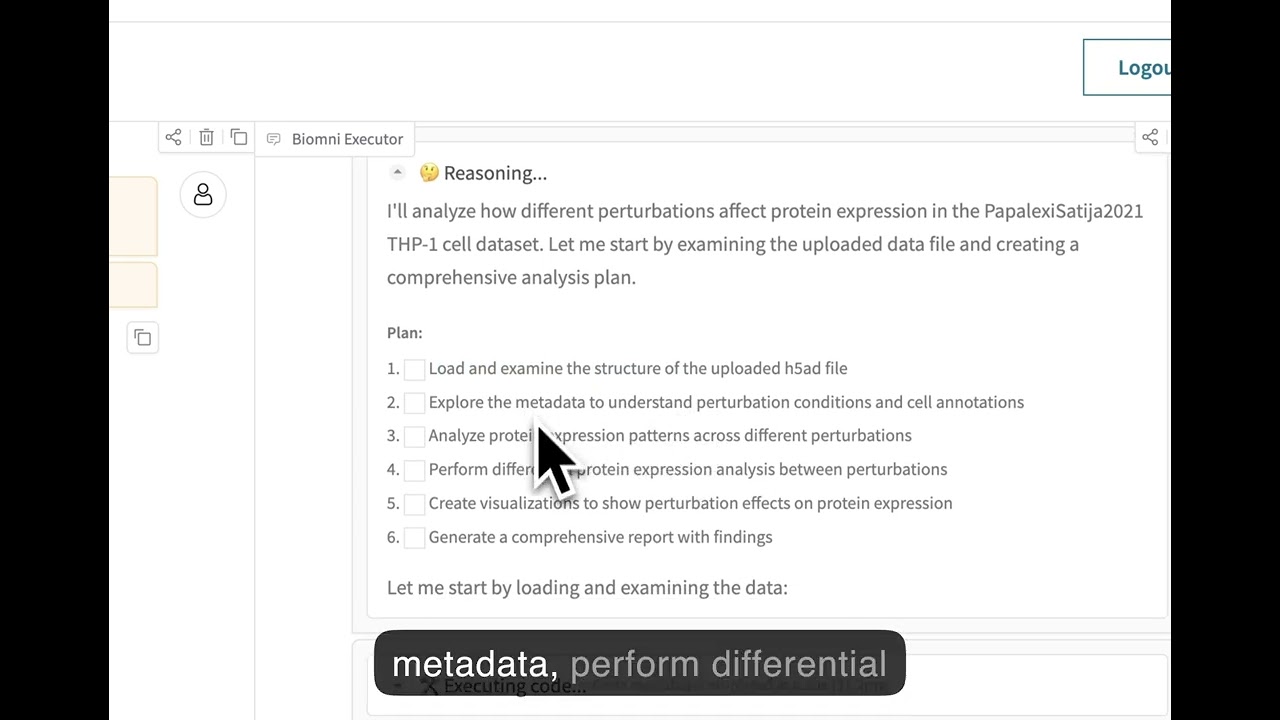
Biomni also ships a Chainlit-based UI with an interactive plan-then-approve workflow:
- Before executing, the agent generates a numbered research plan.
- You review the plan and choose Approve & Execute, Revise Plan, or Cancel.
- After approval, the full ReAct loop runs with each step shown as a collapsible trace (Thinking → Code → Observation → Answer).
Setup (one-time):
# Inside the biomni_e1 environment
conda activate biomni_e1
pip install "chainlit>=1.0"
Launch:
bash run_chainlit.sh                   # opens http://localhost:8000
bash run_chainlit.sh --port 8080       # custom port
bash run_chainlit.sh --headless        # no browser auto-open (servers/CI)
Note: Always use
bash run_chainlit.sh— notchainlit run chainlit_app.pydirectly. The script ensures the correctbiomni_e1Python is used even when another virtual environment (.venv) is active in the same shell.
Environment variables (optional):
| Variable | Default | Description |
|---|---|---|
BIOMNI_LLM |
claude-sonnet-4-5 |
LLM model used by both agents |
BIOMNI_PATH |
./data |
Data directory for the agent |
Biomni can be run as a containerized service with external access:
cp .env.example .env
docker compose build
docker compose up -d
Then open http://localhost:8000 (or your VM public IP).
For full VM deployment instructions (firewall/security group, operations, and hardening), see docs/docker_vm_deployment.md.
By default, Biomni automatically downloads the datalake files (~11GB) when you create an agent. You can control this behavior:
# Skip automatic datalake download (faster initialization)
agent = A1(path='./data', llm='claude-sonnet-4-20250514', expected_data_lake_files = [])
This is useful for:
- Faster testing and development
- Environments with limited storage or bandwidth
- Cases where you only need specific tools that don't require datalake files If you plan on using Azure for your model, always prefix the model name with azure- (e.g. llm='azure-gpt-4o').
Biomni includes a centralized configuration system that provides flexible ways to manage settings. You can configure Biomni through environment variables, runtime modifications, or direct parameters.
from biomni.config import default_config
from biomni.agent import A1

# RECOMMENDED: Modify global defaults for consistency
default_config.llm = "gpt-4"
default_config.timeout_seconds = 1200

# All agents AND database queries use these defaults
agent = A1() # Everything uses gpt-4, 1200s timeoutNote: Direct parameters to A1() only affect that agent's reasoning, not database queries. For consistent configuration across all operations, use default_config or environment variables.
For detailed configuration options, see the Configuration Guide.
Generate PDF reports of execution traces:
from biomni.agent import A1

# Initialize agent
agent = A1(path='./data', llm='claude-sonnet-4-20250514')

# Run your task
agent.go("Your biomedical task here")

# Save conversation history as PDF
agent.save_conversation_history("my_analysis_results.pdf")
PDF Generation Dependencies:
Click to expand
For optimal PDF generation, install one of these packages:# Option 1: WeasyPrint (recommended for best layout control)
# Conda environment (recommended)
conda install weasyprint
# System installation
brew install weasyprint # macOS
apt install weasyprint # Linux
# See [WeasyPrint Installation Guide](https://doc.courtbouillon.org/weasyprint/stable/first_steps.html) for detailed instructions.
# Option 2: markdown2pdf (Rust-based, fast and reliable)
# macOS:
brew install theiskaa/tap/markdown2pdf
# Windows/Linux (using Cargo):
cargo install markdown2pdf
# Or download prebuilt binaries from:
# https://github.com/theiskaa/markdown2pdf/releases/latest
# Option 3: Pandoc (pip installation)
pip install pandocBiomni supports MCP servers for external tool integration:
from biomni.agent import A1

agent = A1()
agent.add_mcp(config_path="./mcp_config.yaml")
agent.go("Find FDA active ingredient information for ibuprofen")
Built-in MCP Servers:
For usage and implementation details, see the MCP Integration Documentation and examples in tutorials/examples/add_mcp_server/ and tutorials/examples/expose_biomni_server/.
Biomni-R0 is our first reasoning model for biology, built on Qwen-32B with reinforcement learning from agent interaction data. It's designed to excel at tool use, multi-step reasoning, and complex biological problem-solving through iterative self-correction.
- 🤗 Model: biomni/Biomni-R0-32B-Preview
- 📝 Technical Report: biomni.stanford.edu/blog/biomni-r0-technical-report
To use Biomni-R0 for agent reasoning while keeping database queries on your usual provider (recommended), run a local SGLang server and pass the model to A1() directly.
- Launch SGLang with Biomni-R0:
python -m sglang.launch_server --model-path RyanLi0802/Biomni-R0-Preview --port 30000 --host 0.0.0.0 --mem-fraction-static 0.8 --tp 2 --trust-remote-code --json-model-override-args '{"rope_scaling":{"rope_type":"yarn","factor":1.0,"original_max_position_embeddings":32768}, "max_position_embeddings": 131072}'- Point the agent to your SGLang endpoint for reasoning:
from biomni.config import default_config
from biomni.agent import A1

# Database queries (indexes, retrieval, etc.) use default_config
default_config.llm = "claude-3-5-sonnet-20241022"
default_config.source = "Anthropic"

# Agent reasoning uses Biomni-R0 served via SGLang (OpenAI-compatible API)
agent = A1(
    llm="biomni/Biomni-R0-32B-Preview",
    source="Custom",
    base_url="http://localhost:30000/v1",
    api_key="EMPTY",
)

agent.go("Plan a CRISPR screen to identify genes regulating T cell exhaustion")
Biomni-Eval1 is a comprehensive evaluation benchmark for assessing biological reasoning capabilities across diverse tasks. It contains 433 instances spanning 10 biological reasoning tasks, from gene identification to disease diagnosis.
Tasks Included:
- GWAS causal gene identification (3 variants)
- Lab bench Q&A (2 variants)
- Patient gene detection
- Screen gene retrieval
- GWAS variant prioritization
- Rare disease diagnosis
- CRISPR delivery method selection
Resources:
- 🤗 Dataset: biomni/Eval1
- 💻 Quick Start:
from biomni.eval import BiomniEval1

evaluator = BiomniEval1()
score = evaluator.evaluate('gwas_causal_gene_opentargets', 0, 'BRCA1')Biomni includes a Know-How Library — a curated collection of best practices, protocols, and troubleshooting guides for biomedical techniques. These documents are automatically retrieved by the A1 agent when relevant to provide domain expertise and practical knowledge.
Features:
- Automatic retrieval based on query relevance
- Metadata tracking (authors, affiliations, licensing, commercial use)
- Compatible with commercial mode (filters non-commercial content)
We're actively seeking community contributions to expand our Know-How Library! Share your expertise by contributing:
- Lab protocols (cell culture, flow cytometry, western blotting, etc.)
- Analysis best practices (NGS workflows, microscopy techniques, etc.)
- Troubleshooting guides (common issues and solutions)
- Experimental design guidelines (sample size, controls, validation)
- Domain-specific knowledge (drug formulation, animal models, clinical trials, etc.)
Know-how documents should be practical, succinct, and include proper attribution. Use this know-how as an example.
To contribute: Create a markdown file following our template and submit a pull request.
Biomni is an open-science initiative that thrives on community contributions. We welcome:
- 🔧 New Tools: Specialized analysis functions and algorithms
- 📊 Datasets: Curated biomedical data and knowledge bases
- 💻 Software: Integration of existing biomedical software packages
- 📋 Benchmarks: Evaluation datasets and performance metrics
- 📚 Know-How: Best practices, protocols, and domain expertise
- 📚 Misc: Tutorials, examples, and use cases
- 🔧 Update existing tools: many current tools are not optimized - fix and replacements are welcome!
Check out this Contributing Guide on how to contribute to the Biomni ecosystem.
If you have particular tool/database/software in mind that you want to add, you can also submit to this form and the biomni team will implement them.
Biomni-E1 only scratches the surface of what’s possible in the biomedical action space.
Now, we’re building Biomni-E2 — a next-generation environment developed with and for the community.
We believe that by collaboratively defining and curating a shared library of standard biomedical actions, we can accelerate science for everyone.
Join us in shaping the future of biomedical AI agent.
- Contributors with significant impact (e.g., 10+ significant & integrated tool contributions or equivalent) will be invited as co-authors on our upcoming paper in a top-tier journal or conference.
- All contributors will be acknowledged in our publications.
- More contributor perks...
Let’s build it together.
Biomni 101 - Basic concepts and first steps
More to come!
Experience Biomni through our no-code web interface at biomni.stanford.edu.
- Security warning: Currently, Biomni executes LLM-generated code with full system privileges. If you want to use it in production, please use in isolated/sandboxed environments. The agent can access files, network, and system commands. Be careful with sensitive data or credentials.
- This release was frozen as of April 15 2025, so it differs from the current web platform.
- Biomni itself is Apache 2.0-licensed, but certain integrated tools, databases, or software may carry more restrictive commercial licenses. Review each component carefully before any commercial use.
@article{huang2025biomni,
  title={Biomni: A General-Purpose Biomedical AI Agent},
  author={Huang, Kexin and Zhang, Serena and Wang, Hanchen and Qu, Yuanhao and Lu, Yingzhou and Roohani, Yusuf and Li, Ryan and Qiu, Lin and Zhang, Junze and Di, Yin and others},
  journal={bioRxiv},
  pages={2025--05},
  year={2025},
  publisher={Cold Spring Harbor Laboratory}
}