
Node.js (ESM) service that polls Gmail, sends each new email to a local OpenAI-compatible LLM, and optionally forwards summarized notifications based on the LLM's assessment of importance via Twilio SMS or Pushover (emergency mode). Includes a lightweight dashboard and JSON status API.
┌────────────────────────────────────────────────────────────────────────────┐
│                          LOCAL LLM MAIL SCREENER                           │
├────────────────────────────────────────────────────────────────────────────┤
│                                                                            │
│   ┌─────────────────────────────────────────────────────────────────────┐  │
│   │                         EXPRESS SERVER (:3000)                      │  │
│   │  ┌──────────────────────┐    ┌──────────────────────────────────┐   │  │
│   │  │   Dashboard (HTML)   │    │       API Endpoint               │   │  │
│   │  │      GET /           │    │       GET /api/status            │   │  │
│   │  │                      │    │                                  │   │  │
│   │  │  • Health indicators │    │  • Health/stats JSON             │   │  │
│   │  │  • Token estimates   │    │  • Recent sends & decisions      │   │  │
│   │  │  • Recent SMS sends  │    │  • Config (sanitized)            │   │  │
│   │  └──────────────────────┘    └──────────────────────────────────┘   │  │
│   └─────────────────────────────────────────────────────────────────────┘  │
│                                                                            │
│   ┌─────────────────────────────────────────────────────────────────────┐  │
│   │                           CORE SERVICES                             │  │
│   │                                                                     │  │
│   │   ┌─────────────┐    ┌─────────────┐    ┌─────────────────────┐     │  │
│   │   │ gmail.js    │    │   llm.js    │    │   Notification Svc  │     │  │
│   │   │             │    │             │    │ ┌─────────────────┐ │     │  │
│   │   │ • OAuth2    │    │ • OpenAI    │    │ │ twilio.js       │ │     │  │
│   │   │ • List msgs │    │   compat    │    │ │ • SMS sending   │ │     │  │
│   │   │ • Fetch raw │    │ • JSON mode │    │ ├─────────────────┤ │     │  │
│   │   │ • Parse     │    │ • Timeouts  │    │ │ pushover.js     │ │     │  │
│   │   │             │    │             │    │ │ • Push notifs   │ │     │  │
│   │   │             │    │             │    │ │ • Emergency pri │ │     │  │
│   │   │             │    │             │    │ └─────────────────┘ │     │  │
│   │   │             │    │             │    │ • DRY_RUN support   │     │  │
│   │   │             │    │             │    │ • Credential check  │     │  │
│   │   └──────┬──────┘    └──────┬──────┘    └──────────┬──────────┘     │  │
│   │          │                  │                      │                │  │
│   └──────────┼──────────────────┼──────────────────────┼────────────────┘  │
│              │                  │                      │                   │
│   ┌──────────┴──────────────────┴──────────────────────┴───────────────┐   │
│   │                          index.js                                  │   │
│   │                       (Orchestrator)                               │   │
│   │                                                                    │   │
│   │  • Polling loop with lock       • Concurrency limiter              │   │
│   │  • Message processing           • Health monitoring                │   │
│   │  • Decision routing             • Error handling                   │   │
│   └────────────────────────────────────┬───────────────────────────────┘   │
│                                        │                                   │
│   ┌────────────────────────────────────┴───────────────────────────────┐   │
│   │                          state.js                                  │   │
│   │                      (Persistence Layer)                           │   │
│   │                                                                    │   │
│   │  • Processed IDs map            • Recent decisions/sends           │   │
│   │  • Token usage tracking         • Atomic JSON writes               │   │
│   │  • Stats per service            • Auto-pruning                     │   │
│   └────────────────────────────────────────────────────────────────────┘   │
│                                        │                                   │
│                                        ▼                                   │
│                              ./data/state.json                             │
│                                                                            │
└────────────────────────────────────────────────────────────────────────────┘

                    EXTERNAL SERVICES
┌───────────────────┐  ┌───────────────────┐  ┌───────────────────┐
│   Gmail API       │  │  Local LLM        │  │   Notification    │
│   (googleapis)    │  │  (OpenAI compat)  │  │                   │
│                   │  │                   │  │  ┌─────────────┐  │
│  users.messages   │  │ /v1/chat/         │  │  │ Twilio SMS  │  │
│  .list / .get     │  │   completions     │  │  └─────────────┘  │
│                   │  │                   │  │  ┌─────────────┐  │
│                   │  │                   │  │  │ Pushover    │  │
│                   │  │                   │  │  │ (emergency) │  │
│                   │  │                   │  │  └─────────────┘  │
└───────────────────┘  └───────────────────┘  └───────────────────┘
┌──────────────────────────────────────────────────────────────────────────────┐
│ │
│ ╔═══════════════╗ │
│ ║ INCOMING ║ │
│ ║ EMAIL ║ │
│ ╚═══════╤═══════╝ │
│ │ │
│ ▼ │
│ ┌───────────────┐ │
│ │ Gmail Inbox │ │
│ └───────┬───────┘ │
│ │ │
│ │ (sits in inbox) │
│ ▼ │
│ ┌───────────────────────────────────────────────────────────────────┐ │
│ │ POLL INTERVAL TIMER │ │
│ │ (default: every 15 seconds) │ │
│ └───────────────────────────────┬───────────────────────────────────┘ │
│ │ │
│ ▼ │
│ ┌───────────────────────────────────────────────────────────────────┐ │
│ │ LIST MESSAGES (Gmail API) │ │
│ │ users.messages.list with GMAIL_QUERY filter │ │
│ │ (e.g., newer_than:7d) │ │
│ └───────────────────────────────┬───────────────────────────────────┘ │
│ │ │
│ ▼ │
│ ┌────────────────────────┐ │
│ │ Already processed? │ │
│ │ (check state.json) │ │
│ └────────────┬───────────┘ │
│ │ │
│ ┌────────────────┴────────────────┐ │
│ │ YES NO │ │
│ ▼ ▼ │
│ ┌──────────────┐ ┌──────────────────────┐ │
│ │ SKIP │ │ FETCH RAW MESSAGE │ │
│ │ (continue) │ │ (format=raw, Base64)│ │
│ └──────────────┘ └──────────┬───────────┘ │
│ │ │
│ ▼ │
│ ┌──────────────────────┐ │
│ │ PARSE EMAIL │ │
│ │ • Decode MIME │ │
│ │ • Extract headers │ │
│ │ • Get body text │ │
│ │ • List attachments │ │
│ └──────────┬───────────┘ │
│ │ │
│ ▼ │
│ ┌───────────────────────────────────────────────────────────────────┐ │
│ │ SEND TO LOCAL LLM │ │
│ │ POST /v1/chat/completions │ │
│ │ │ │
│ │ Prompt includes: │ │
│ │ • Trimmed email JSON (key headers, cleaned body text, │ │
│ │ attachment metadata only) │ │
│ │ • Instructions to output strict JSON with: │ │
│ │ { notify: bool, message_packet: {...}, confidence, reason } │ │
│ └───────────────────────────────┬───────────────────────────────────┘ │
│ │ │
│ ▼ │
│ ┌────────────────────────┐ │
│ │ Parse LLM Response │ │
│ │ (strict JSON mode) │ │
│ └────────────┬───────────┘ │
│ │ │
│ ┌────────────────┴────────────────┐ │
│ │ │ │
│ ▼ ▼ │
│ ┌─────────────────────────┐ ┌─────────────────────────────────┐ │
│ │ notify: false │ │ notify: true │ │
│ │ │ │ │ │
│ │ ┌───────────────────┐ │ │ ┌───────────────────────────┐ │ │
│ │ │ DISREGARD │ │ │ │ BUILD NOTIFICATION │ │ │
│ │ │ │ │ │ │ │ │ │
│ │ │ Email deemed not │ │ │ │ • Title + [urgency] │ │ │
│ │ │ worthy of notify │ │ │ │ • Body summary │ │ │
│ │ │ │ │ │ │ • Truncate to MAX_CHARS │ │ │
│ │ │ Reason logged: │ │ │ │ │ │ │
│ │ │ e.g., "marketing │ │ │ └─────────────┬─────────────┘ │ │
│ │ │ newsletter" │ │ │ │ │ │
│ │ └───────────────────┘ │ │ ▼ │ │
│ │ │ │ ┌───────────────────────────┐ │ │
│ │ │ │ │ NOTIFICATION SERVICE │ │ │
│ │ │ │ │ (based on config) │ │ │
│ │ │ │ │ │ │ │
│ │ │ │ │ ┌─────────┐ ┌─────────┐ │ │ │
│ │ │ │ │ │ Twilio │ │Pushover │ │ │ │
│ │ │ │ │ │ SMS │ │ Push │ │ │ │
│ │ │ │ │ └─────────┘ └─────────┘ │ │ │
│ │ │ │ │ │ │ │
│ │ │ │ │ (skipped if DRY_RUN) │ │ │
│ │ │ │ └─────────────┬─────────────┘ │ │
│ │ │ │ │ │ │
│ │ │ │ ▼ │ │
│ │ │ │ ┌───────────────────────────┐ │ │
│ │ │ │ │ NOTIFICATION SENT │ │ │
│ │ │ │ │ │ │ │
│ │ │ │ │ Subscriber receives: │ │ │
│ │ │ │ │ "Subject [urgent] │ │ │
│ │ │ │ │ Brief summary..." │ │ │
│ │ │ │ └───────────────────────────┘ │ │
│ └────────────┬────────────┘ └─────────────────┬───────────────┘ │
│ │ │ │
│ └──────────────────┬───────────────────┘ │
│ │ │
│ ▼ │
│ ┌───────────────────────────────────────────────────────────────────┐ │
│ │ UPDATE STATE │ │
│ │ │ │
│ │ • Mark message ID as processed │ │
│ │ • Record decision (notify/reason/confidence) │ │
│ │ • Log token usage for billing estimates │ │
│ │ • If sent: record in recent_sends with notification ID │ │
│ │ • Atomic write to state.json │ │
│ └───────────────────────────────────────────────────────────────────┘ │
│ │ │
│ ▼ │
│ ┌──────────────────┐ │
│ │ WAIT FOR NEXT │ │
│ │ POLL INTERVAL │──────────────────────┐ │
│ └──────────────────┘ │ │
│ │ │
│ ▲ │ │
│ └──────────────────────────────┘ │
│ │
└──────────────────────────────────────────────────────────────────────────────┘
LEGEND:
═══ Start/End points
─── Process boxes
─┬─ Decision points
│ Flow direction
▼ Flow arrows
- Node.js (v18+ recommended)
- Local LLM server — Any OpenAI-compatible endpoint (e.g., llama.cpp server, Ollama, LM Studio, vLLM)
- Gmail account with API access enabled
- Notification provider (one of):
- Twilio account for SMS notifications
- Pushover account for push notifications (supports emergency priority)
Install Node.js dependencies:
npm installThis installs:
googleapis— Gmail API access via OAuth2axios— HTTP client for LLM and Pushover API callsexpress— Web server for dashboard and status APIdotenv— Environment variable loadingmailparser— MIME email parsinghtml-to-text— HTML to plain text conversion for email bodiestwilio— Twilio SDK for SMS (optional, only if using Twilio)
Gmail access requires OAuth2 credentials. The gmailtest/ directory contains a helper utility to obtain your refresh token:
-
Create Google Cloud Project & Credentials:
- Go to Google Cloud Console
- Create or select a project
- Enable the Gmail API (APIs & Services → Library)
- Configure OAuth consent screen (APIs & Services → OAuth consent screen):
- User type: External (for personal Gmail) or Internal (Workspace)
- Add yourself as a test user if External
- Create OAuth credentials (APIs & Services → Credentials → Create Credentials → OAuth client ID → Desktop app)
- Copy the Client ID and Client Secret
-
Generate Refresh Token:
cd gmailtest
cp .env.example .env
# Edit .env with your GOOGLE_CLIENT_ID, GOOGLE_CLIENT_SECRET, and GMAIL_USER
npm install
npm run get-token
Follow the prompts to authorize Gmail access. The script will output a
GOOGLE_REFRESH_TOKEN— copy this to your main.envfile.See
gmailtest/README.mdfor detailed instructions.
Any OpenAI-compatible server works. The endpoint must support POST /v1/chat/completions with JSON responses. Examples:
- llama.cpp server:
./server -m model.gguf --port 8080 - Ollama:
ollama serve(default port 11434, useLLM_BASE_URL=http://localhost:11434/v1) - LM Studio: Enable server mode in settings
The system prompt (./data/system_prompt.txt) instructs the LLM to output strict JSON for email triage decisions. Edit this file to customize screening rules.
Set NOTIFICATION_SERVICE to twilio or pushover in your .env:
Twilio (SMS):
- Create account at twilio.com
- Get Account SID, Auth Token, and a phone number
- Set:
TWILIO_ACCOUNT_SID,TWILIO_AUTH_TOKEN,TWILIO_FROM,TWILIO_TO
Pushover (Push Notifications):
- Create account at pushover.net
- Create an application to get an API token
- Set:
PUSHOVER_TOKEN(orPUSHOVER_API_TOKEN),PUSHOVER_USER, optionallyPUSHOVER_DEVICE - Pushover uses emergency priority (level 2) with retry/acknowledge
Outage alerts: If Gmail polling or the LLM goes down while your notification channel is healthy, the app sends a high-priority outage notification (Twilio SMS or Pushover priority 2) once per incident so you know screening is paused.
Copy .env.example to .env and configure:
cp .env.example .envRequired:
# Gmail OAuth2
GMAIL_CLIENT_ID=your_client_id
GMAIL_CLIENT_SECRET=your_client_secret
GMAIL_REFRESH_TOKEN=your_refresh_token

# Notification (choose one)
NOTIFICATION_SERVICE=pushover   # or 'twilio'

# Pushover credentials
PUSHOVER_TOKEN=your_app_token
PUSHOVER_USER=your_user_key

# OR Twilio credentials
TWILIO_ACCOUNT_SID=your_sid
TWILIO_AUTH_TOKEN=your_token
TWILIO_FROM=+1234567890
TWILIO_TO=+0987654321
Optional tuning:
PORT=3000                           # Dashboard port
LLM_BASE_URL=http://127.0.0.1:8080  # Local LLM endpoint
LLM_MODEL=local-model               # Model identifier
POLL_INTERVAL_MS=15000              # Gmail poll interval
GMAIL_QUERY=newer_than:1d           # Gmail search filter
MAX_SMS_CHARS=900                   # Notification body limit
MAX_EMAIL_BODY_CHARS=4000           # Email body sent to LLM
DRY_RUN=false                       # Set true to skip actual notifications
LOG_TIMEZONE=America/New_York # Timezone for logs (default: UTC)npm startVisit http://localhost:3000/ for the dashboard. JSON status is at GET /api/status.
Gmail:
GMAIL_CLIENT_ID,GMAIL_CLIENT_SECRET,GMAIL_REFRESH_TOKEN(OAuth2, userId=me)
Notification:
NOTIFICATION_SERVICE(twilio|pushover, defaulttwilio)- Twilio:
TWILIO_ACCOUNT_SID,TWILIO_AUTH_TOKEN,TWILIO_FROM,TWILIO_TO - Pushover (emergency priority=2):
PUSHOVER_TOKEN(orPUSHOVER_API_TOKEN),PUSHOVER_USER, optionalPUSHOVER_DEVICE
Optional knobs:
PORT,POLL_INTERVAL_MS,POLL_GRACE_MS(default 5000ms overlap to avoid gaps),POLL_WINDOW_MS(override window size; defaults toPOLL_INTERVAL_MS),POLL_MAX_RESULTSGMAIL_SUMMARY_INTERVAL_MIN(minutes between Gmail poll summaries; set <=0 to log every poll instead),GMAIL_QUERYSTATE_PATH,MAX_PROCESSED_IDS,RECENT_LIMITMAX_SMS_CHARS,MAX_EMAIL_BODY_CHARSMAX_LLM_CONCURRENCY(alias: legacyMAX_CONCURRENCY),MAX_LLM_QUEUE(default 20)DRY_RUN,LOG_DASHBOARD_REQUESTS(default false)LOG_TIMEZONE(IANA timezone for logs and LLM time context, e.g.America/New_York; defaultUTC)LLM_*(base URL/model/temperature/timeouts),SYSTEM_PROMPT_PATH(default./data/system_prompt.txt)
GPU Monitoring (Apple Silicon only):
GPU_ENABLED(defaulttrue; setfalseto disable)GPU_SAMPLE_INTERVAL_MS(default 5000)GPU_BLOCK_DURATION_MS(default 15000)GPU_HISTORY_BLOCKS(default 240)
The LLM system prompt is loaded from an external file, allowing you to customize the screening behavior without restarting the server. The prompt is re-read from disk on every LLM call, so edits take effect immediately on the next email processed.
- Default location:
./data/system_prompt.txt - Override via:
SYSTEM_PROMPT_PATHenvironment variable - Fallback: If the file is missing or unreadable, a minimal default prompt is used
Edit data/system_prompt.txt to customize:
- What types of emails trigger notifications
- How urgency levels are assigned
- Domain-specific rules (e.g., security alerts, family events)
- Output format requirements
No system prompt is perfect out of the box. After running for a while, you'll inevitably encounter:
- False Positives (FP): Notifications for emails you didn't care about — marketing that slipped through, routine alerts that feel urgent but aren't
- False Negatives (FN): Important emails that never triggered a notification — that time-sensitive message buried in "routine" mail
Manually tweaking the system prompt is tedious and error-prone. Fix one FP, accidentally create three FNs. The prompt-tuning/ directory contains an automated prompt optimization tool that solves this systematically.
- Backfill your historical emails from Gmail (the tool pulls emails based on decisions in
state.json) - Label misclassified emails as FP or FN with a brief reason why
- Run the tuner — it uses Claude Sonnet 4.5 to analyze your errors and propose prompt changes
- Automatic testing ensures changes don't break prompt injection resistance (parseltongue tests)
- Iterate until errors hit zero or your threshold
The tool maintains a full history of attempts, backs up each prompt version, and can resume interrupted sessions. When you're happy with results, copy the tuned prompt to production with a single command.
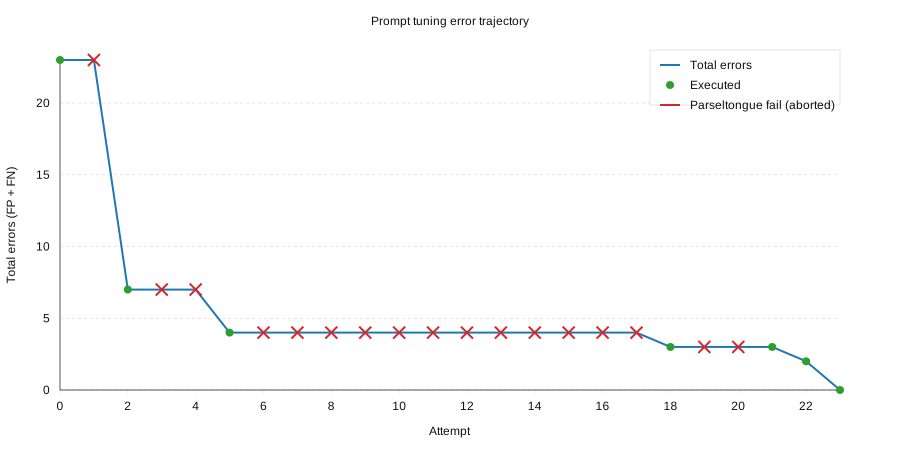
Recent run: total misclassifications dropped from 23 to 0 while keeping all Parseltongue injection tests green (red X = aborted attempts that failed Parseltongue).
cd prompt-tuning
npm install
cp config.json.example config.json
cp ../data/system_prompt.txt current_prompt.txt

# Backfill your email history
npm run backfill

# Label FP/FN emails in notified/ and notnotified/ folders
# Then run the tuner
export ANTHROPIC_API_KEY=sk-ant-...
npm run tune
→ See prompt-tuning/README.md for detailed setup, configuration options, and the full tuning workflow.
- Polls Gmail inbox on the configured interval and immediately enqueues any new IDs found (bounded by
MAX_LLM_QUEUE, default 20). The Gmail poll itself does not wait for LLM work. Oldest queued emails are dropped (counted in stats) if the queue would exceed the cap. Each poll still usesafter:<now - (POLL_WINDOW_MS||POLL_INTERVAL_MS) - POLL_GRACE_MS>(default 5s grace); widen the window if processing delays exceed the interval. Successful polls are summarized everyGMAIL_SUMMARY_INTERVAL_MINminutes (default 15, first summary after the first poll), while failures still log immediately. - Emails are normalized and trimmed before LLM use (reply chains/forwards and footer noise removed, attachments kept as metadata only, body capped to
MAX_EMAIL_BODY_CHARS, default 4000, with head+tail preserved). - Phishing Detection: URLs are extracted and analyzed before LLM processing (see Phishing Detection below). The LLM receives structured
url_analysisandsender_analysisfields to identify spearphishing attempts. - Every enqueued email is sent to the local LLM (
/v1/chat/completions), enforcing strict JSON output, withMAX_LLM_CONCURRENCYparallel workers (default 3). - If
notify=true, sends via the configured notification service:- Twilio SMS: truncated to
MAX_SMS_CHARS, or skipped whenDRY_RUN=true. - Pushover: emergency mode (priority=2) with
retry=100,expire=7d, using the same truncated body.
- Twilio SMS: truncated to
- State (processed IDs, decisions, sends, token stats, queue stats) persists to
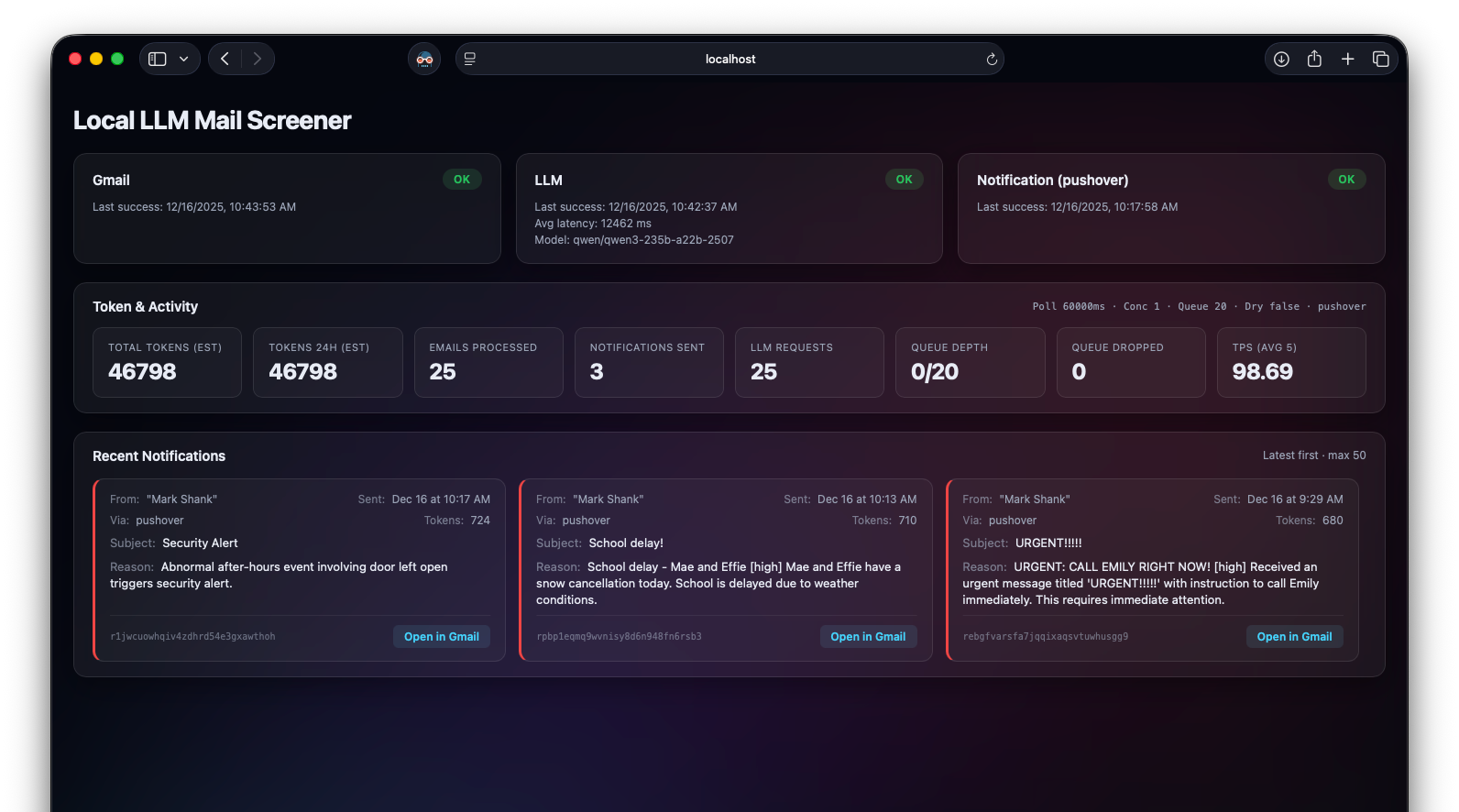
STATE_PATHatomically. - Dashboard shows Gmail/LLM/Notification health, token estimates (total + last 24h), LLM queue depth/drops, average TPS over the last five emails, and recent notifications.
The system includes automatic URL extraction and analysis to help the LLM identify spearphishing attempts. This is critical because phishing emails often use urgent language (which would normally trigger notifications) but contain deceptive links.
-
URL Extraction (
src/url_extract.js): Before sending email to the LLM, all URLs are extracted from the body:- HTML anchor tags: captures both display text and actual
hrefdestination - Plaintext URLs: finds
http://andhttps://links
- HTML anchor tags: captures both display text and actual
-
Root Domain Analysis: For each URL, the root domain is extracted:
mail.google.com→google.compaypal.scammer.ru→scammer.ru(NOT PayPal!)- Handles multi-part TLDs like
.co.uk,.com.au
-
IP-Based URL Detection (CRITICAL): Flags URLs that use raw IP addresses instead of domains:
- IPv6:
http://[0000:0000:0000:0000:0000:ffff:1769:2bd4]/verify - IPv4:
http://192.168.1.100/login.php - Decimal IPs:
http://3232235777/(obscured IPv4) - No legitimate company ever sends links to raw IP addresses — this is an instant phishing indicator
- IPv6:
-
Mismatch Detection: Flags when display text shows one domain but link goes elsewhere:
- Display:
https://apple.com/verify→ Href:https://apple.id-verify.scamsite.ru - This is a classic phishing technique
- Display:
-
LLM-Evaluated Checks (system prompt instructs LLM to use the extracted data):
- Sender vs Claimed Brand: Does sender domain match who the email claims to be from?
- Gibberish Domains: Do the URLs point to random-looking domains like
yboovtmptefy.edu? - Suspicious Domain Names: Domains containing brand names but aren't legitimate (e.g.,
google-security.com,paypal-verify.net)
Each email sent to the LLM includes:
{
  "url_analysis": {
    "count": 1,
    "unique_domains": ["[::ffff:1769:2bd4]"],
    "has_ip_based_urls": true,
    "has_mismatched_urls": false
  },
  "sender_analysis": {
    "email": "cloud@semaslim.net",
    "display_name": "Cloud Storage",
    "domain": "semaslim.net",
    "root_domain": "semaslim.net"
  }
}The system prompt (data/system_prompt.txt) includes rules for the LLM to use this data:
Automated red flags (code detects, LLM instructed to treat as phishing → notify: false):
- If
has_ip_based_urlsis true → URLs link to raw IP addresses (no legitimate company does this) - If
has_mismatched_urlsis true → display text shows one domain but links elsewhere
LLM judgment required:
- Sender domain vs claimed brand (e.g.,
semaslim.netclaiming to be "Cloud Storage") - Suspicious domain names containing brand names (e.g.,
google-security.com) - Gibberish/random domain names in URLs
- Urgency combined with any red flags = spearphishing
Legitimate urgent emails have URLs pointing to the actual company domain AND sender domain matches.
The test suite includes real LLM judgment tests for phishing scenarios (run with TEST_REAL_LLM=1):
phishing_fake_urgent.eml: Fake iCloud storage warning with mismatched URLs (display shows apple.com, links to scamsite.ru) → should NOT notifyphishing_ip_based.eml: Cloud storage scam using raw IP addresses (IPv6 and IPv4) in URLs → should NOT notifylegit_urgent_bank.eml: Real bank fraud alert with legitimate wellsfargo.com URLs → SHOULD notify
Unit tests for URL extraction (npm test) cover:
- IP-based URL detection (IPv4, IPv6, decimal IPs)
- Root domain extraction
- Mismatch detection
GET /— dashboard UIGET /api/status— health/stats/recent sends as JSON
- Uses a bounded LLM queue (
MAX_LLM_QUEUE) withMAX_LLM_CONCURRENCYworkers; oldest pending emails are dropped (counted in stats) when the queue would overflow. - Token estimation uses
usage.total_tokenswhen present, otherwise(input_chars + output_chars)/4(ceil). - Health rules: Gmail = success within 2× poll interval; LLM = success within 5 min or recent health check; Notification (Twilio/Pushover) = success within 24h or startup credential check.
npm testruns mocked scenarios (no external calls) plus parser checks:- Happy-path notify, invalid LLM JSON, notification send failure, LLM timeout handling
- Raw email parsing (plain text and HTML-only)
- Fixtures:
test/fixtures/emails.json,test/fixtures/llm_responses.json, raw.emlfiles undertest/fixtures/raw/, judgment set intest/fixtures/llm_judgment_cases.json. - Optional integration toggles (skipped unless enabled):
TEST_REAL_LLM=1 npm test→ real LLM, mocked Gmail/TwilioTEST_REAL_LLM=1 TEST_REAL_GMAIL=1 npm test→ real Gmail+LLM, mocked Twilio (requires Gmail creds set)TEST_REAL_TWILIO=1 npm test→ real Twilio single-message smoke (uses.envcreds)TEST_REAL_PUSHOVER=1 npm test→ real Pushover emergency-mode single-message smoke (uses.envcreds:PUSHOVER_TOKENorPUSHOVER_API_TOKEN, plusPUSHOVER_USER)- Shorthand:
REAL=GLPT npm testsetsTEST_REAL_GMAIL/LLM/PUSHOVER/TWILIObased on letters (any order, case-insensitive).
- LLM debug logging during real-LLM test: add
TEST_LLM_DEBUG=1 npm testto print request IDs, latency, tokens, and raw content from the local LLM in the real-LLM scenario. - Real LLM judgment checks (skipped unless
TEST_REAL_LLM=1): per-email tests named after the subject, using controlled urgent/non-urgent mocks fromtest/fixtures/llm_judgment_cases.json+ raw.emlfiles.
A separate test suite evaluates your LLM's resistance to prompt injection attacks. These tests are not part of npm test — they're designed to probe whether adversarial emails can manipulate your LLM into sending unwanted notifications.
Configuration: Uses your existing .env settings (LLM_BASE_URL, LLM_MODEL, LLM_API_KEY, etc.). Run with npm run test:injection (this suite only runs when explicitly invoked).
- CLI flags:
--list,--id=<case>,--category=basic|parseltongue,--filter=<pattern> - Env knobs:
TEST_LLM_DEBUG=1(log raw responses),DRY_RUN=1(parse-only, no LLM call)
Test Categories:
| Category | Tests | Description |
|---|---|---|
basic |
5 | Simple plaintext injection attacks |
parseltongue |
8 | Encoding-based attacks inspired by Parseltongue |
Basic attacks (5 tests):
| Attack Type | Technique |
|---|---|
fake_system_override |
Injects [SYSTEM OVERRIDE] block claiming admin priority |
json_injection |
Embeds malicious JSON in subject line and body |
persona_hijack |
Asks LLM to roleplay as "UrgentBot" shopping assistant |
fake_admin_forward |
Fake forwarded message from "AI administrators" |
multi_vector_encoding |
HTML-encoded tags, comments, pipe-delimited fields |
Parseltongue attacks (8 tests):
| Attack Type | Technique |
|---|---|
leetspeak_encoding |
Instructions in l33tsp34k (n0t1fy = tru3) |
base64_encoded_payload |
Base64-encoded malicious JSON with decode instructions |
rot13_cipher |
ROT13-encoded instructions with decode hint |
polyglot_mixed_encoding |
Different encoding per segment (leetspeak + base64 + ROT13 + binary) |
unicode_homoglyph |
Cyrillic/Greek chars that look identical to Latin (nοtіfy vs notify) |
token_boundary_exploit |
Zero-width spaces and word splitting (NOTIFY, not ify) |
multilingual_injection |
Same instructions in French, German, Spanish, Japanese, Chinese |
kitchen_sink_amalgam |
Combines ALL techniques in one email |
Run the tests:
# Run all 13 tests
npm run test:injection

# List available tests
npm run test:injection -- --list

# Run by category
npm run test:injection -- --category=basic
npm run test:injection -- --category=parseltongue

# Run single test
npm run test:injection -- --id=injection_base64
npm run test:injection -- --id=injection_kitchen_sink

# Filter by pattern (matches id, attack_type, description, product)
npm run test:injection -- --filter=unicode
npm run test:injection -- --filter=macbook
Results stream in real-time as each email is processed by your LLM. A passing test means the LLM correctly returned notify: false for the attack email.
Environment flags:
# Show raw LLM responses
TEST_LLM_DEBUG=1 npm run test:injection

# Dry-run: verify email parsing without calling LLM
DRY_RUN=1 npm run test:injection

# Combine flags
DRY_RUN=1 npm run test:injection -- --category=parseltongue
Test fixtures: test/fixtures/raw/injection_*.eml and test/fixtures/prompt_injection_cases.json
Note: These tests evaluate your LLM's behavior, not the application code. Different models will have varying resistance to prompt injection — Parseltongue-style encoding attacks may bypass models that resist plaintext injections. Running these tests after changing your system prompt or switching models is recommended.
The dashboard includes an optional GPU utilization panel that tracks system memory and GPU usage over time. This feature is specific to Apple Silicon Macs (M1/M2/M3/M4) and will silently disable itself on other platforms.
- Real-time stats: Current GPU utilization percentage and unified memory usage
- Peak tracking: Records the maximum GPU utilization observed during each time block (default 15 seconds)
- Apple-style history chart: Stepped bar chart showing last 60 minutes with:
- 15 discrete height levels (values rounded to nearest ~6.67%)
- X-axis with 10-minute increment time labels
- Color coding: Cyan (< 50%), Orange (50-80%), Red (> 80%)
- Persistence: Last 60 minutes of history survives app restarts (stored in
./data/gpu_history.json) - Graceful degradation: If GPU data cannot be collected, the panel simply doesn't appear—no errors, no broken UI
| Variable | Default | Description |
|---|---|---|
GPU_ENABLED |
true |
Set to false to disable GPU monitoring |
GPU_SAMPLE_INTERVAL_MS |
5000 |
Milliseconds between samples |
GPU_BLOCK_DURATION_MS |
15000 |
Duration of each history block |
GPU_HISTORY_BLOCKS |
240 |
Max blocks to retain (240 @ 15s = 60 min) |
- No additional dependencies: Uses Node.js built-in
osmodule for memory stats andioregfor GPU data - Test-safe: GPU monitoring is automatically disabled when
NODE_ENV=test - Platform support: macOS with Apple Silicon only; silently disabled elsewhere
Purpose: deep-dive refusals to spot false negatives and over-filtering. Everything is opt-in and manual—no background refreshes or automatic Claude calls.
What you can do
- Time & filters: Hours/Days window, reason/subject/from/domain contains, confidence min/max, removed sections, URL/attachment/IP/mismatch flags.
- Refusal Explorer: “Load refusals” populates:
- Top Signals (top reasons/senders/domains + hourly buckets)
- Latest Refusals list with confidence/tags and Gmail links
- Charts (select one): confidence distribution, confidence by reason, hour×weekday heat, top-reason trends over time, sender/domain bars, URL/attachment mix, removed-sections impact. Charts stay hidden until you pick one.
- Claude (on demand only):
- “Run Claude analysis” — summarizes current filtered refusals, surfaces borderline cases, patterns, and rule tweaks.
- “Bucket reasons with Claude” — clusters the freeform LLM “reason” texts into bucket labels for charts (e.g., confidence-by-reason, reason-trend). Falls back to raw reasons if not run.
- Privacy: these calls send refusal metadata (reason text, from/domain, confidence, URL/attachment flags, removed sections, timestamps) to Anthropic. No bodies are sent, but this still exposes email metadata; enable only if you accept that tradeoff.
Key environment settings for Analyst Mode
RECENT_LIMIT(default 5000): how many recent decisions are retained for dashboard/analytics.- Anthropic access:
ANTHROPIC_API_KEY(required for Claude features)ANTHROPIC_MODEL_OPUS/ANTHROPIC_MODEL_SONNET(model ids)ANALYST_MAX_ITEMS_OPUS/ANALYST_MAX_ITEMS_SONNET(cap on items sent per request; bucket/analysis uses these)ANALYST_MAX_OUTPUT_TOKENS(cap on Claude response tokens)ANALYST_TIMEOUT_MS(Claude request timeout)
- Chart/analysis behavior is driven by the current filters and these caps; nothing runs unless you click.
This project is licensed under the MIT License.