优美的接口文档制作工具

- 如果你有编写 Restful API 文档的需求
- 恰好你日常使用 Python 作为主要的编程语言
那你值得拥有这款神器!
- 要求
Python版本高于3.4 - 使用
pip命令一键安装
pip install eave
编写脚本,用于生成文档
# demo.py

# 第1步,引入 eave 包内组件
from eave import Doc, Note, Api, UP, QP, BP

# 也可以使用 * 方式完全引入
from eave import *


# 第2步,创建一个 doc 对象,并指定文档的标题和接口调用地址
doc = Doc(title='My Api Document', host='www.myapi.com')


# 第3步,如果需要的话,为文档添加描述信息,描述信息会出现在标题下方(支持 markdown 语法)
doc.description = """
the content of description is **markdown** format
1. one point
2. two point
3. three point
"""


# 第4步,如果需要的话,为文档添加一些详细的说明,这些内容会出现在接口目录的下方(支持 markdown 语法)
doc.add_note(
    title="note title",
    content="the content of note is also **markdown** format"
)


# 第5步,添加一个接口,通过 uri method query_params 等参数进行描述
doc.add_api(
    title='Get all orders of shop',
    uri='/shop/<id>/orders/',
    method='GET',
    description='Get all orders of shop, shop admin login required',
    uri_params=[
        UP(name='id', description='the id of shop')
    ],
    query_params=[
        QP(name='page', type='integer', default=1),
        QP(name='page_size', type='integer', default=10),
    ],
    response_example="""
{
    "page": 1,
    "page_size": 10,
    "data": [
        {
          "order_id": "0021",
          "order_price": "120.00",
          "order_name": "xxx1",
        }
    ]
}
"""
)


# 继续添加接口,可支持的 method 有 GET POST PUT PATCH DELETE 等
doc.add_api(
    title='Create a product',
    uri='/products/',
    method='POST',
    body_params=[
        BP(name='name', required=True),
        BP(name='category', example='food'),
        BP(name='price', type='float', default=0),
    ],
    content_types=['application/json'],
    body_example="""
{
    "name": "Sprite 250ml",
    "category": "food",
    "price": 3.5
}
""",
    tips="""some `tips` for this api, also **markdown** format"""
)


# 第6步,添加文档结尾,markdown 格式
doc.ending = """
This is the end of document, **thankyou**!
"""


# 第7步,使用 build 方法构建生成文档,最后产出 html 文件
doc.build('best.html')
python demo.py
生成的 html 文件可以直接用浏览器(推荐 chrome)打开查看
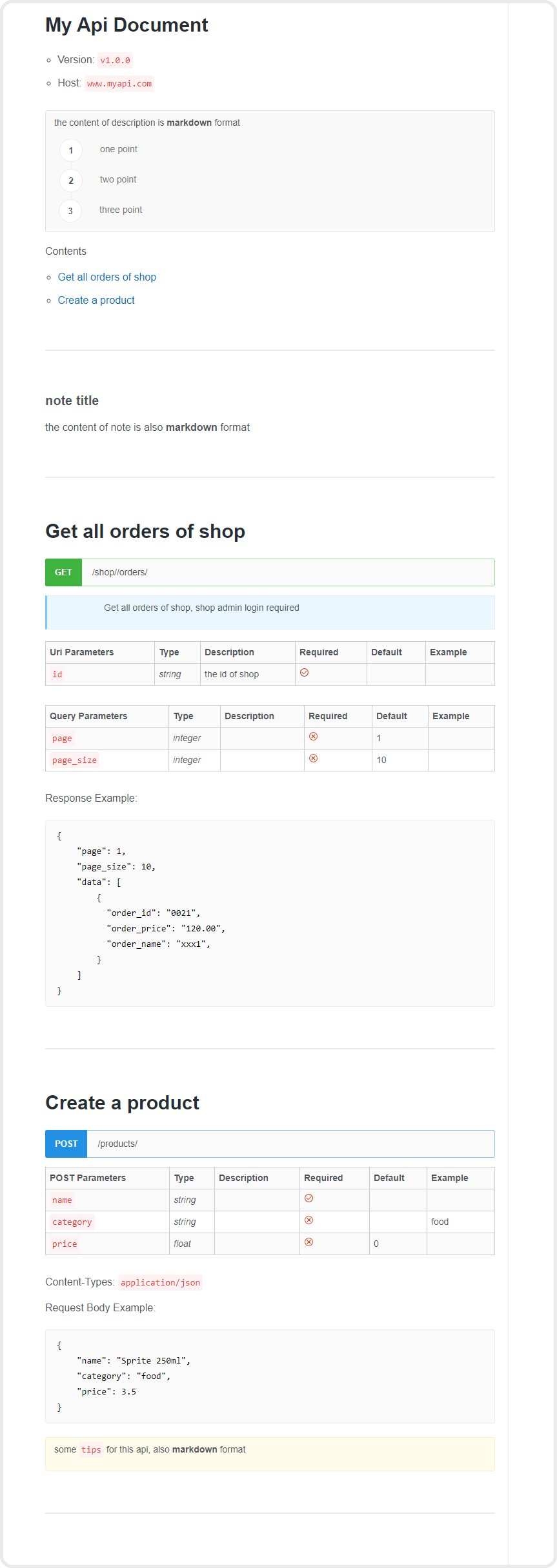
样式美观、结构合理,效果如下图:
# 指定 language 为 zh,构建中文文档
doc.build('best_zh.html', language='zh')

# 自定义文档模版
doc.template = 'eave/template.html'
doc.build('best1.html')

# 将文档对象导出为 json
json_data = doc.to_json()

# 导入 json 创建文档对象
doc2 = Doc(json_data)
doc2.title = 'My Second Api Document'
doc2.build('best2.html')

# 将文档对象导出为 yaml
yaml_data = doc.to_yaml()

# 导入 yaml 创建文档对象
doc3 = Doc(yaml_data)
doc3.build('best3.html')

# 在添加 api 时,也通过 from_md 参数,引入单独编写的 markdown 文件作为文档内容
doc.add_api(
    title="获取订单列表接口",
    uri="/orders/list/",
    from_md="orders.md",
)

# 使用 raml 创建文档对象(不完全支持 raml)
from eave.utils import raml2eave
doc = raml2eave('example.raml')
doc.build('example.html', 'zh')

# 根据 django-rest-framework 的代码自动生成 Api 对象
from eave.utils import auto_drf_apis
api_list, api_post, api_detail, actions = auto_drf_apis('用户', '/api/users/', UserViewSet)
doc.add_apis(api_list, api_post, api_detail, *actions)