ADAMIXTURE includes native support for generating high-quality visualizations of ancestry proportions. Following the method of Clumppling, it automatically aligns clusters across runs and K values through optimal cluster matching and mode detection, ensuring that same-colored bars represent the same ancestral components across different subplots. The alignment and mode-detection routines are built into ADAMIXTURE, so no extra package is required.
To generate a plot automatically after training, use the --plot flag:
$ adamixture -k 8 --data_path data.bed --save_dir out/ --name test --plot pdf 300Arguments for --plot are optional:
- Format (e.g.,
pdf,png,jpg). Default:png. - Resolution (DPI, e.g.,
300). Default:300.
The following flags are available for both adamixture --plot and adamixture-plot:
- Population Labels (Level 1): Use
--labelsto provide a file with one population name per sample. Samples will be grouped by population and sorted by ancestry within each group. - Hierarchical Grouping (Level 2): Use
--labels2to provide a file with one coarser group label per sample (e.g., super-population or region). A bracket annotation tier is drawn under the level-1 tick marks. - Hierarchical Grouping (Level 3): Use
--labels3to provide a file with one even coarser label per sample (e.g., continent). A second bracket annotation tier is drawn below the level-2 tier. - Custom Colors: Use
--colorsto provide a file with hex or named colors (one per line). See Custom Colors File Format below for details.
All three label files must have the same number of lines as there are samples. Levels 2 and 3 are only shown if the corresponding file is provided.
When training across a sweep of --min_k and --max_k, you can choose between two plotting modes:
-
Combined single plot (
--plot): Generates a single combined multi-panel plot containing all$K$ subplots stacked vertically (similar toadamixture-plot), fully aligned for easy visualization of ancestry shifts. The resulting file will be namedname.minK_maxK.png. This is the default behavior.$ adamixture --min_k 5 --max_k 8 --data_path data.bed --save_dir out/ --name test --plot png 300Here is an example of a combined sweep plot (
--plot) aligning$K=2$ to$K=7$ :
-
Individual plots per K (
--plot_single): Generates a separate plot file for each$K$ in the sweep (e.g.,name.K.png), sequentially aligned so that ancestral components keep consistent colors from$K=i$ to$K=i+1$ .$ adamixture --min_k 5 --max_k 8 --data_path data.bed --save_dir out/ --name test --plot_single png 300

For comparing multiple runs or different adamixture-plot command.
Note
This command is a standalone post-processing tool. It does not retrain the models; it automatically aligns existing .Q matrices provided in a filemap using Clumppling's optimal cluster matching for color consistency across runs.
By default, adamixture-plot generates a multi-panel stacked bar chart with all runs aligned:
$ adamixture-plot \
    --filemap project.filemap \
    --labels populations.txt \
    --labels2 regions.txt \
    --labels3 continents.txt \
    --colors my_palette.txt \
    --save_dir . \
    --name comparison \
    --format png
The --labels, --labels2, and --labels3 flags accept files with one label per line, one line per sample, matching the order of samples in the Q matrices:
--labels(level 1): Finest grouping. Used to draw vertical boundaries and x-axis tick marks between populations.--labels2(level 2): Intermediate grouping (e.g., super-population). Drawn as a bracket annotation tier below the tick marks.--labels3(level 3): Coarsest grouping (e.g., continent). Drawn as a second bracket tier below level 2.
Here is an example of a multi-level plot of Oceania populations generated after training:

$ adamixture-plot \
    --filemap project.filemap \
    --clumppling \
    --labels populations.txt \
    --format png
When --clumppling is enabled, you can fine-tune mode detection using the following parameters:
| Argument | Description |
|---|---|
--comm_min |
Minimum cost threshold for grouping runs into a single consensus mode (default: 1e-4). |
--comm_max |
Maximum cost threshold above which runs are separated into distinct modes (default: 1e-2). |
--cd_res |
Resolution parameter for Louvain community detection (default: 1.0). Higher values ( |
--no_test_comm |
Skip the statistical significance test for community structure, forcing direct community partitioning of replicates. |
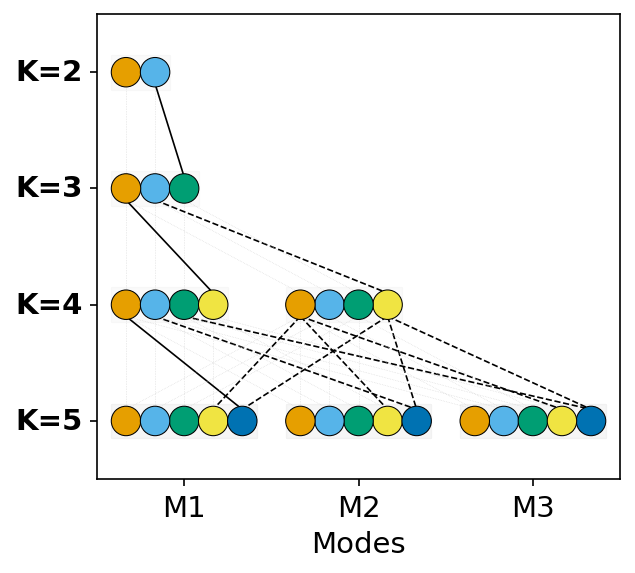
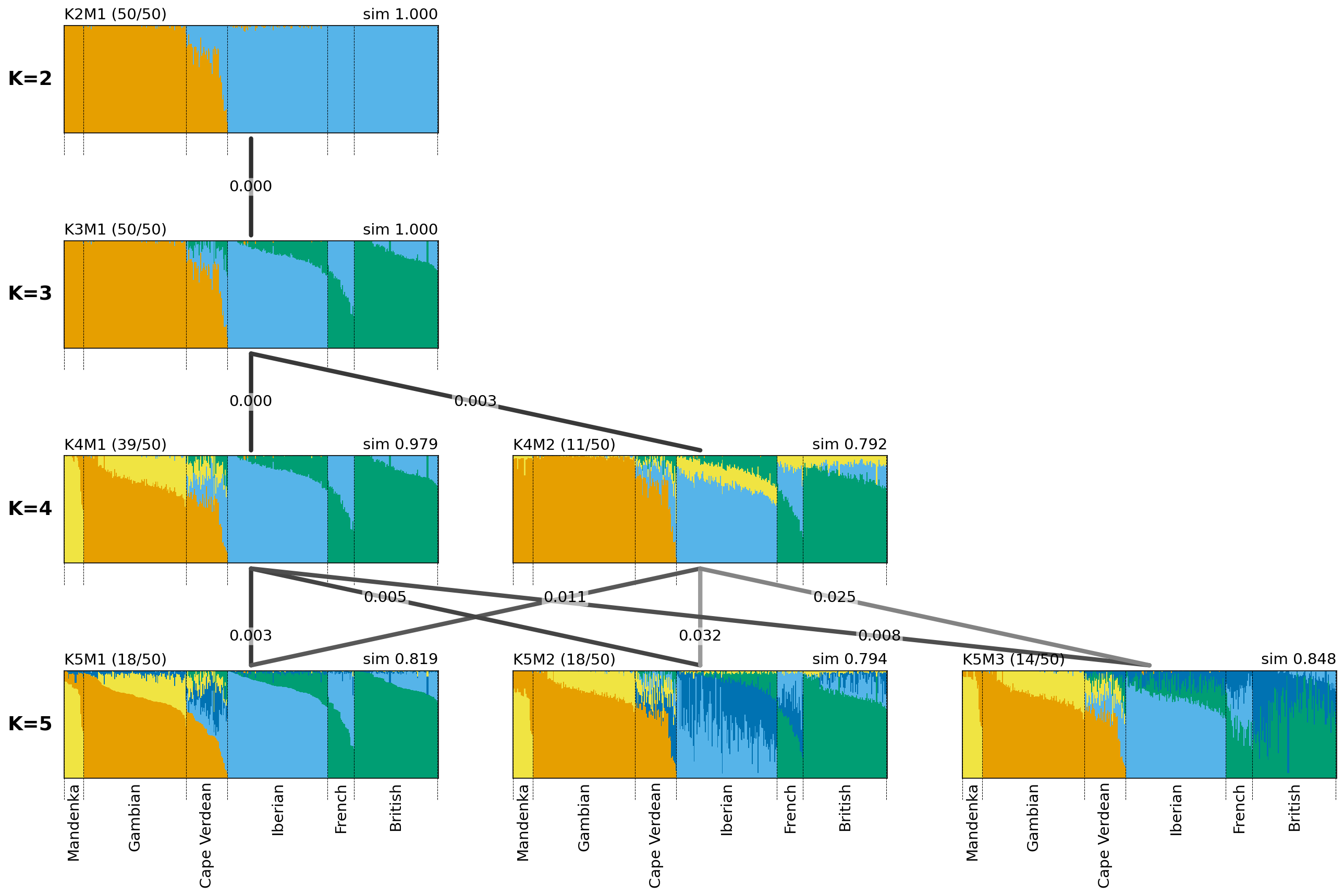
The --clumppling mode outputs a combined publication-ready figure containing:
-
Mode Alignment Tree: Top diagram displaying cluster divergence and mapping across
$K$ values. - Membership Alignment Graph: Bottom diagram showing aligned ancestry proportions for each mode along with inter-mode cost values.
A filemap is a three-column, tab-delimited file. Each line describes a single Q matrix:
- Unique ID: Must contain at least one letter and cannot contain
#or.. - K Value: The number of clusters.
- Path: Path to the
.Qfile (relative to the filemap's directory).
Example project.filemap:
RunA_K3    3    results/run1.Q
RunB_K5    5    results/run2.Q
RunC_K5    5    results/run3.Q
The custom colors file supplied to --colors is a simple text file containing one color code per line. Color codes can be specified as:
- HEX codes: e.g.,
#FF5733 - Standard CSS color names: e.g.,
crimson,royalblue,forestgreen
The file must contain at least as many colors as the highest
Example colors.txt:
#1f77b4
#ff7f0e
#2ca02c
#d62728
#9467bd
#8c564b
#e377c2
#7f7f7f